NEWS

All-New Apple Home Hub Reportedly Launching as Soon as October

Just now

14

All-New Apple Home Hub Reportedly Launching as Soon as October


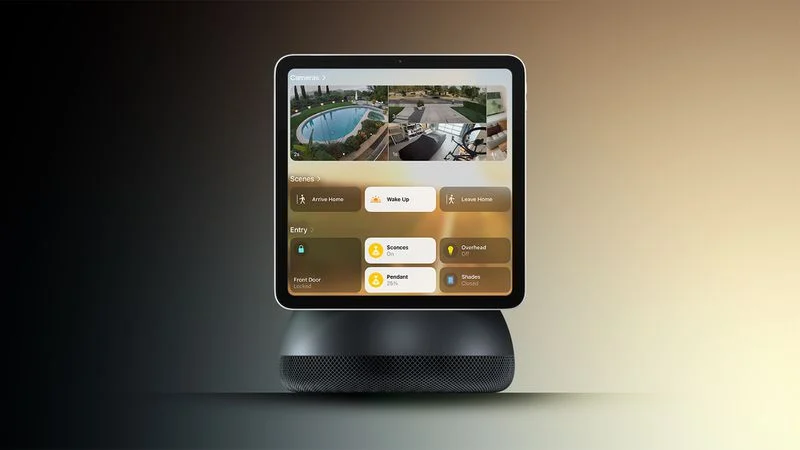
Apple plans to release an all-new smart home hub at some point between October and early next year, according to Bloomberg's Mark Gurman.


Siri AI is expected to be a core feature of the hub, which is designed to be placed in rooms throughout your house, such as a kitchen, living room, or bedroom. The report said the device will be available in tabletop and wall-mounted versions, with Apple apparently believing that many customers will buy more than one.


The hub will essentially combine a HomePod-like speaker with a 7-inch display. The report said the device runs an entirely new operating system based on the Apple TV's tvOS platform, with the interface described as tvOS blended with watchOS and iOS. There will be a grid of icons, widgets, and apps, along with customizable clock faces.


With built-in facial recognition, the hub can identify who is looking at the display and show personalized information, the report said. As a user approaches the hub, or moves away from it, the size of the interface elements will change.


Other features mentioned include FaceTime video calls, home security monitoring, HomeKit accessory management, photo galleries, a calendar, music playback, and an intercom system for households with multiple Apple home devices.


Apple also continues to work on an advanced in-home security camera that would compete with Amazon's Ring products, according to the report.


Source: Macrumors



Windows
Mac OS
iOS
Linux
3uTools
Win 64-bit For this device
V9.07 2026-07-17
Download
Win 32-bit For this device
V9.07 2026-07-17
Download
3uTools
Intel Chip How to Identify Chip Type
V9.05 2026-07-25
Download
Apple Silicon
V9.05 2026-07-25
Download
How to Identify Chip Type
1.  Click the Apple icon in the top-left corner of the screen and select About This Mac.
2.  Check the Processor or Chip field to determine if it is "Intel" or "Apple".
Please use the 3uTools PC client to install the iOS client:
1、 Install either the Windows or Mac version of 3uTools on your computer
2、 Open the PC client and connect your device to the computer via USB cable
3、 After the connection is successful, wait for the computer to automatically install the mobile app for the device, or locate “Install Mobile App” on the computer and manually click to install.
3uTools
deb file
V9.01 2026-05-28
Download
rpm file
V9.01 2026-05-28
Download
Windows
Windows
iOS
iOS
Android
Android
TV
TV
3uAirPlayer
Win 64-bit For this device
V6.0.6 2026-06-26
Download
Win 32-bit For this device
V6.0.6 2026-06-26
Download
iOS Device Mirroring (No App Required)
1、 Install 3uAirPlayer on the Windows PC
2、 Open Control Center and select Screen Mirroring
3、 From the list, choose your PC to start mirroring
4、 Or connect your iOS device to the PC via USB to begin mirroring
Scan to get "3uAirPlayer" App
3uAirPlayerTV
 
TV System Requirements: Android 7.0 or later
Download the TV installation package, copy it to a USB drive, insert it into your TV or set-top box, then select the file from the home screen to install.