 NEWS
NEWS
tvOS 27 and watchOS 27 Now Available to Public Beta Testers
 07/14/2026
 702
702
Apple today released the first public betas of tvOS 27 and watchOS 27, giving Apple TV and Apple Watch users a chance to try the new software ahead of its fall launch. There's also a new HomePod Software 27 beta for the HomePod and HomePod mini.
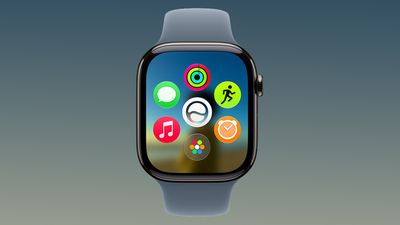
You can sign up for Apple's public beta testing program on the beta website, and then download the updates through the Settings app on each device. Today's public betas are the same as the third developer betas released last week.
watchOS 27 adopts Siri AI, and you can use Siri from your wrist as long as you have an iPhone that supports it. Siri AI can access your personal information, answer all kinds of questions, and complete tasks for you. There is a dedicated Siri app that's front and center on the watch in the new dynamic app grid that comes up when pressing the Digital Crown.
There's a new gesture for selecting a widget in the Smart Stack, plus Apple added Smart Stack suggestions for finding a parked car, accessing a transit card, and getting a birthday reminder.
Workout Buddy works without your iPhone nearby, treadmill run and walk distances are tracked more accurately, and Apple added a unified Find My app that also supports Precision Finding.
tvOS 27 has a redesigned Podcasts app, Hi-Res Lossless audio and AutoMix song transitions in Apple Music, and easier profile switching. With performance improvements, apps launch faster, animations are speedier, and devices connect more quickly when AirPlaying content.
More on what's new in the updates can be found in our watchOS 27 roundup and Apple TV roundup.
Source: Macrumors










