NEWS

iOS 27 Introduces Overhauled AirPods Settings Menu

06/10/2026

54

 iOS 27 Introduces Overhauled AirPods Settings Menu


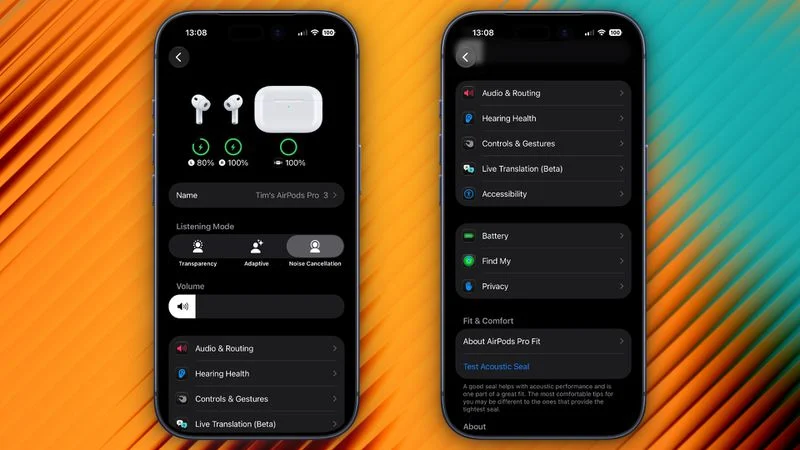
When AirPods owners connect to their iPhone running iOS 27, they'll see a completely revamped settings menu for their earbuds that does a better job at organizing all of the feature options that Apple has added over the last few years.


In the first iOS 27 developer beta, released on Monday, the new settings menu can be accessed in the same way as the old one – i.e. by appearing only when your AirPods are paired with your iPhone – but the menu itself is now a lot more easy to navigate.


Apple has added a volume slider under the Listening Mode toggles, while the Hearing Health, Call Controls/Camera Control, Live Translation and Adaptive Audio sections have been condensed into separate menus identified by new icons: Accessibility, Audio & Routing, Hearing Health, and Controls & Gestures. There are also new menus for Battery, Privacy, and Find My options.


The new design makes the AirPods settings menu a lot more compact, and it no longer feels like you have to endlessly scroll to try and find the option you're after. Apple has also implemented the redesign in System Settings for macOS 27 Golden Gate.


Apple plans to release a public beta version of iOS 27 and macOS 27 next month, with a general release of the updates expected in the fall.


Source: Macrumors

Windows
Mac OS
iOS
Linux
3uTools
Win 64-bit For this device
V9.06 2026-04-09
Download
Win 32-bit For this device
V9.06 2026-04-09
Download
3uTools
Intel Chip How to Identify Chip Type
V9.03 2026-03-27
Download
Apple Silicon
V9.03 2026-03-27
Download
How to Identify Chip Type
1.  Click the Apple icon in the top-left corner of the screen and select About This Mac.
2.  Check the Processor or Chip field to determine if it is "Intel" or "Apple".
Please use the 3uTools PC client to install the iOS client:
1、 Install either the Windows or Mac version of 3uTools on your computer
2、 Open the PC client and connect your device to the computer via USB cable
3、 After the connection is successful, wait for the computer to automatically install the mobile app for the device, or locate “Install Mobile App” on the computer and manually click to install.
3uTools
deb file
V9.01 2026-05-28
Download
rpm file
V9.01 2026-05-28
Download
Windows
Windows
iOS
iOS
Android
Android
TV
TV
3uAirPlayer
Win 64-bit For this device
V6.0.5 2026-04-23
Download
Win 32-bit For this device
V6.0.5 2026-04-23
Download
iOS Device Mirroring (No App Required)
1、 Install 3uAirPlayer on the Windows PC
2、 Open Control Center and select Screen Mirroring
3、 From the list, choose your PC to start mirroring
4、 Or connect your iOS device to the PC via USB to begin mirroring
Scan to get "3uAirPlayer" App
3uAirPlayer TV V1.0.18
2025-11-28
TV System Requirements: Android 7.0 or later
Download the TV installation package, copy it to a USB drive, insert it into your TV or set-top box, then select the file from the home screen to install.