 NEWS
NEWS
Google Expands AirDrop Support to More Android Phones
 06/03/2026
 794
794
Google today said its Quick Share feature that allows Android and iPhone users to exchange files with AirDrop is expanding to more devices.
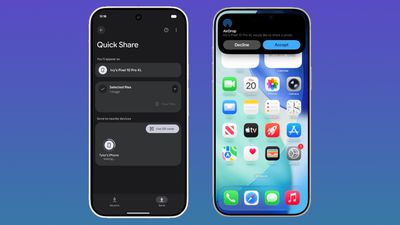
Quick Share is now available on the following Android smartphones.
Samsung:
- Galaxy S26, S26+, S26 Ultra
- Galaxy S25, S25+, S25 Ultra, S25 Edge (new)
- Galaxy S24, S24+, S24 Ultra (new)
- Galaxy Z Flip7 (new)
- Galaxy Z Fold7 (new)
- Galaxy Z Flip6 (new)
- Galaxy Z Fold6 (new)
- Galaxy Z TriFold (new)
Google:
- Pixel 10, 10 Pro, 10 Pro XL, 10 Pro Fold, 10a
- Pixel 9, 9 Pro, 9 Pro XL, 9 Pro Fold, 9a
- Pixel 8a
Other Smartphone Makers:
- HONOR Magic V6 (new)
- OnePlus 15 (new)
- Xiaomi 17T Pro
- OPPO Find X9, X9 Pro, X9 Ultra, X9s
- OPPO Find N6
- Vivo X300, X300 Pro, X300 Ultra
Quick Share is the Android equivalent of AirDrop, and Google added AirDrop integration in November 2025. iPhone users can AirDrop files and photos to Quick Share-enabled Android devices, while Android users can use Quick Share to send files and photos to iPhone users.
On an Android device, users need to make sure the Share with Apple devices setting is turned on and that the iPhone user sets AirDrop visibility to "Everyone for 10 minutes" through the Control Center. From there, an Android to iPhone file transfer is identical to a standard AirDrop transfer on the iPhone end.
On an iPhone, sharing a file to an Android smartphone is done through the standard AirDrop interface. Android owners receiving files will need to make sure Quick Share Receive mode is on, and then an iPhone user sending a file will see the Android device in the AirDrop list.
Android devices that are not compatible with Quick Share can generate a QR code that can be used to share content with iPhone users via the cloud.
Though Google positions the Quick Share to AirDrop file transfer feature as an Android/iPhone option, Android users can also exchange files with iPads and Macs.
Google plans to bring Quick Share to the Motorola Razr Fold 2026, OPPO Find X8 series, and HONOR Magic8 Pro in the coming months.
Source: Macrumors










