 NEWS
NEWS
iPhone 20 Rumored to Feature Radical Curved Design
 04/01/2026
 1336
1336
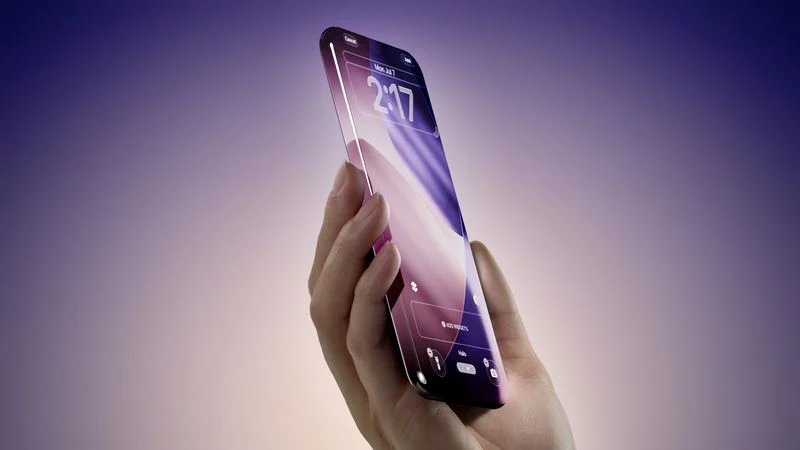
Apple's 20th anniversary iPhone will feature a radical new curved design with slimmer bezels, according to a new report.
The X user "@phonefuturist" shared the claims across two posts yesterday and today. The first suggested that the device, referred to as the "anniversary" iPhone, will feature a 1.1mm bezel around the display, along with a seamlessly curved design. The post included a mock-up image showing convex display glass curving down at the edges to meet a slim, iPhone X-like polished frame. The iPhone 17 Pro has a bezel size of approximately 1.44mm.
In a follow-up post today, the same account today referred to the device as the iPhone "XX" for iPhone 20 and claimed Apple has been evaluating Samsung's under-panel camera (UPC) technology as an alternative to the under-display camera (UDC) approach more commonly discussed in rumors, but found the image quality insufficient. As a result, the post claims the iPhone 20 may ship with either a smaller Dynamic Island than the current iPhone 17 Pro or a punch-hole cutout, paired with Samsung's "Polar ID" face authentication system.
The claims should be taken with a considerable pinch of salt given the source's unknown credibility. That said, the information is being widely circulated on social media, and parts of it broadly align with the direction more established leakers and analysts have been pointing toward for the 20th anniversary iPhone.
●In addition to this information, Apple tried using Samsung's UPC instead of UDC to achieve full screen but the camera quality is still not good better than UDC. So the XX might come with a smaller dynamic island than even the 18 Pro or a punch hole and Samsung's polar ID. https://t.co/tuEer5uieF — Schrödinger (@phonefuturist) March 31, 2026
Apple is reportedly still targeting an all-screen design for the iPhone 20, though as recently as January, reports suggested the all-screen ambition may be in doubt due to the technical difficulty of hiding a front-facing camera beneath the display without degrading photo quality.
The under-display camera problem is well documented. Current UDC implementations, including those used by some Android manufacturers, have struggled to match the image quality of conventionally positioned sensors. With UPC, the camera sits behind the panel but uses a perforated pixel structure rather than a fully transparent region. This means it can theoretically reduce the visual footprint of a cutout, though it has its own quality trade-offs.
If Apple cannot resolve the camera quality issue before the device launches, a smaller Dynamic Island or a conventional punch-hole may represent the fallback position. The iPhone 18 Pro is already expected to be the first iPhone with a smaller Dynamic Island, so the iPhone 20 could take that reduction further still. Apple's 20th anniversary iPhone is expected to arrive in the fall of 2027.
Source: Macrumors










