NEWS

Apple Lays Groundwork for Ads in Maps With iOS 26.5

03/31/2026

22

 Apple Lays Groundwork for Ads in Maps With iOS 26.5


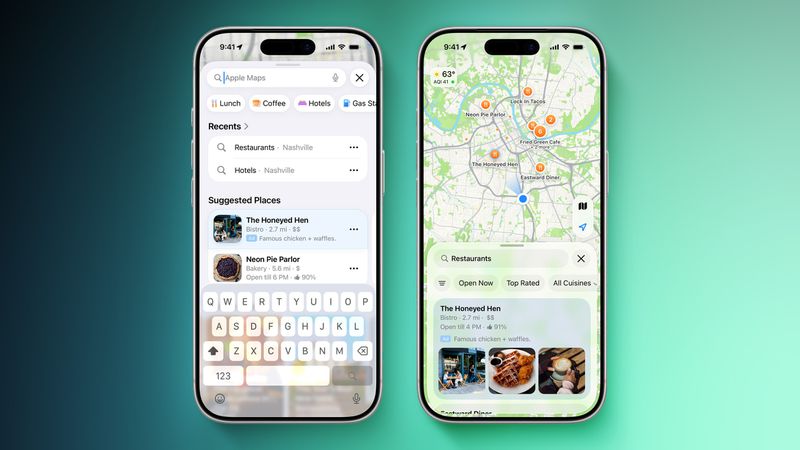
Apple is planning to introduce ads to the Apple Maps app in the near future, and the iOS 26.5 beta lays the groundwork for the feature.


Code in the update says the following: "Maps may show local ads based on your approximate location, current search terms, or view of the map while you search."


Apple also says that a user's location and ads interacted with in ‌Apple Maps‌ are not linked to an Apple account to protect user privacy. Apple does not plan to collect or store Maps app data, or share it with third parties.


Last week, Apple said that ads are coming to the Apple Maps app for iPhone and iPad in the U.S. and Canada "this summer."


Businesses in the U.S. and Canada will be able to show ads in search results and at the top of a "Suggested Places" section in the app, which is new in iOS 26.5. Suggested Places displays recommendations for locations to visit based on trending places nearby, recent searches, and more.


Ads in the Maps app will have a clear "Ad" label, much like the ads shown in the App Store search results.


Source: Macrumors

Windows
Mac OS
iOS
Linux
3uTools
Win 64-bit For this device
V9.05 2026-03-28
Download
Win 32-bit For this device
V9.05 2026-03-28
Download
3uTools
Intel Chip How to Identify Chip Type
V9.03 2026-03-27
Download
Apple Silicon
V9.03 2026-03-27
Download
How to Identify Chip Type
1.  Click the Apple icon in the top-left corner of the screen and select About This Mac.
2.  Check the Processor or Chip field to determine if it is "Intel" or "Apple".
Please use the 3uTools PC client to install the iOS client:
1、 Install either the Windows or Mac version of 3uTools on your computer
2、 Open the PC client and connect your device to the computer via USB cable
3、 After the connection is successful, wait for the computer to automatically install the mobile app for the device, or locate “Install Mobile App” on the computer and manually click to install.
3uTools
deb file
V3.01 2025-11-20
Download
rpm file
V3.01 2025-11-20
Download
Windows
Windows
iOS
iOS
Android
Android
TV
TV
3uAirPlayer
Win 64-bit For this device
V6.0.3 2026-03-11
Download
Win 32-bit For this device
V6.0.3 2026-03-11
Download
iOS Device Mirroring (No App Required)
1、 Install 3uAirPlayer on the Windows PC
2、 Open Control Center and select Screen Mirroring
3、 From the list, choose your PC to start mirroring
4、 Or connect your iOS device to the PC via USB to begin mirroring
Scan to get "3uAirPlayer" App
3uAirPlayer TV V1.0.18
2025-11-28
TV System Requirements: Android 7.0 or later
Download the TV installation package, copy it to a USB drive, insert it into your TV or set-top box, then select the file from the home screen to install.