
NEWS

macOS Tahoe 26.4 Adds Slow Charger Indicator for MacBooks

Just now

57

macOS Tahoe 26.4 includes a new slow charger indicator that tells MacBook users when their charging setup isn't delivering full power.
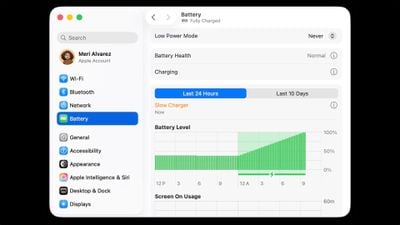
macOS Tahoe 26.4 Adds Slow Charger Indicator for MacBooks
As described in an updated Apple support document, a "Slow Charger" label now appears in orange text in the battery status menu and above the Battery Level graph in Battery settings. The indicator is accompanied by an info button for more details.

Apple says that to charge more quickly, users should use a power adapter and cable that deliver at least the minimum wattage recommended for their MacBook model.

The feature is similar to one Apple added to iPhone with iOS 18, where periods of slow charging appear as an orange bar in the Battery section of the Settings app.

The slow charger indicator is one of two battery-related changes in macOS 26.4. The update also adds a Charge Limit feature that lets MacBook users set a maximum charge level anywhere from 80 to 100 percent, with the aim of preserving long-term battery health.

macOS Tahoe 26.4 is available now via System Settings ➝ General ➝ Software Update.

Source: Macrumors

Windows
Mac OS
iOS
Linux
3uTools
Win 64-bit For this device
V9.03 2026-03-12
Download
Win 32-bit For this device
V9.03 2026-03-12
Download
3uTools
Intel Chip How to Identify Chip Type
V9.02 2026-03-23
Download
Apple Silicon
V9.02 2026-03-23
Download
How to Identify Chip Type
1.  Click the Apple icon in the top-left corner of the screen and select About This Mac.
2.  Check the Processor or Chip field to determine if it is "Intel" or "Apple".
Please use the 3uTools PC client to install the iOS client:
1、 Install either the Windows or Mac version of 3uTools on your computer
2、 Open the PC client and connect your device to the computer via USB cable
3、 After the connection is successful, wait for the computer to automatically install the mobile app for the device, or locate “Install Mobile App” on the computer and manually click to install.
3uTools
deb file
V3.01 2025-11-20
Download
rpm file
V3.01 2025-11-20
Download
Windows
Windows
iOS
iOS
Android
Android
TV
TV
3uAirPlayer
Win 64-bit For this device
V6.0.3 2026-03-11
Download
Win 32-bit For this device
V6.0.3 2026-03-11
Download
iOS Device Mirroring (No App Required)
1、 Install 3uAirPlayer on the Windows PC
2、 Open Control Center and select Screen Mirroring
3、 From the list, choose your PC to start mirroring
4、 Or connect your iOS device to the PC via USB to begin mirroring
Scan to get "3uAirPlayer" App
3uAirPlayer TV V1.0.18
2025-11-28
TV System Requirements: Android 7.0 or later
Download the TV installation package, copy it to a USB drive, insert it into your TV or set-top box, then select the file from the home screen to install.




