NEWS

Here Are 5 Smaller iPhone Air Details You Might Have Missed, Including Only a Single Speaker

09/15/2025

2373

 Here Are 5 Smaller iPhone Air Details You Might Have Missed, Including Only a Single Speaker


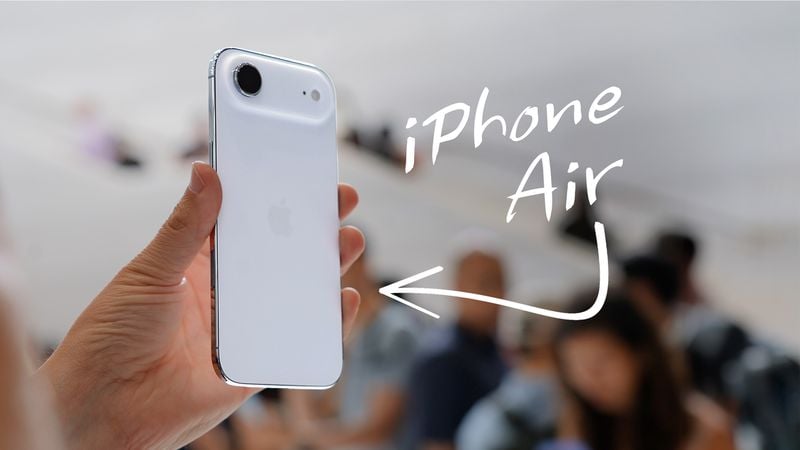
Apple's all-new, ultra-thin iPhone Air launches on Friday, and there are some smaller details about the device that you might have missed.


Below, we outline five things to know about the iPhone Air:


  • As rumored, the iPhone Air only has a single speaker. The earpiece at the top of the device doubles as a speaker, but there is no speaker on the bottom of the device. The holes to the left and right of the USB-C port are for microphones. For stereo audio, use AirPods or a capable external speaker.
  • On the iPhone Air, the Dynamic Island is positioned slightly lower on the screen compared to the iPhone 17 and iPhone 17 Pro models. This was likely necessary due to the device's ultra-thin frame necessitating internal design changes.
  • While the iPhone 17 Pro models support USB 3.2 Gen 2, for data transfer speeds of up to 10 Gbps, the iPhone Air is limited to USB 2 speeds of up to 480 Mbps.
  • Apple says the iPhone Air can be charged to 50% in approximately 30 minutes, whereas the iPhone 17 Pro models can be charged to 50% in approximately 20 minutes. A higher-wattage charger and cable is required to achieve these speeds. In addition, MagSafe wireless charging on the iPhone Air is limited to up to 20W, compared to 25W for the iPhone 17 Pro models.
  • In the iPhone 17 Pro models, the A19 Pro chip has a 6-core GPU. In the iPhone Air, it has a 5-core GPU, so graphics performance will take a slight hit.


Be sure to watch our iPhone Air hands-on video from earlier this week.


Source: Macrumors

Windows
Mac OS
iOS
Linux
3uTools
Win 64-bit For this device
V9.0 2025-11-11
Download
Win 32-bit For this device
V9.0 2025-11-11
Download
3uTools
Intel Chip How to Identify Chip Type
V9.0 2025-12-02
Download
Apple Silicon
V9.0 2025-12-02
Download
How to Identify Chip Type
1.  Click the Apple icon in the top-left corner of the screen and select About This Mac.
2.  Check the Processor or Chip field to determine if it is "Intel" or "Apple".
Please use the 3uTools PC client to install the iOS client:
1、 Install either the Windows or Mac version of 3uTools on your computer
2、 Open the PC client and connect your device to the computer via USB cable
3、 After the connection is successful, wait for the computer to automatically install the mobile app for the device, or locate “Install Mobile App” on the computer and manually click to install.
3uTools
deb file
V3.01 2025-11-20
Download
rpm file
V3.01 2025-11-20
Download
Windows
Windows
iOS
iOS
Android
Android
TV
TV
3uAirPlayer
Win 64-bit For this device
V6.0.2 2025-11-19
Download
Win 32-bit For this device
V6.0.2 2025-11-19
Download
iOS Device Mirroring (No App Required)
1、 Install 3uAirPlayer on the Windows PC
2、 Open Control Center and select Screen Mirroring
3、 From the list, choose your PC to start mirroring
4、 Or connect your iOS device to the PC via USB to begin mirroring
Scan to get "3uAirPlayer" App
3uAirPlayer TV V1.0.18
2025-11-28
TV System Requirements: Android 7.0 or later
Download the TV installation package, copy it to a USB drive, insert it into your TV or set-top box, then select the file from the home screen to install.