NEWS

iOS 16 beta 5 Returns Battery Percentage To The Status Bar

08/09/2022

2831

iOS 16 beta 5 Returns Battery Percentage To The Status Bar


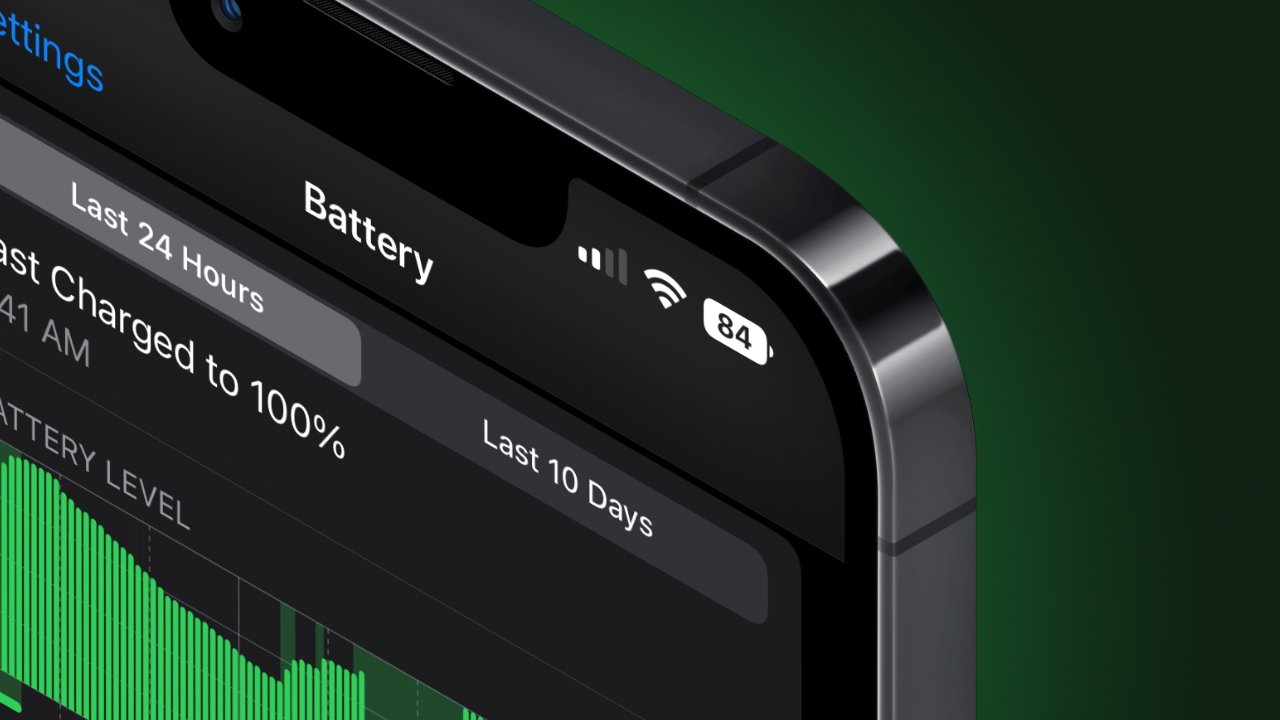
A long-requested feature has finally returned to notched iPhones in iOS 16 — battery percentage in the status bar.


When Apple released the iPhone X with a notched display, there was very little space for the status bar. So, Apple removed the ability to show battery percentage at all times.


This was because Apple would show a battery icon and text for the current battery percentage as two separate objects. Instead, Apple chose to reserve the space for cellular signal information and WiFi connection.


Now, the percentage is represented as a number inside of the battery indicator. This saves on space while keeping the number readable within the small icon.


The feature first appeared in iOS 16 beta 5. It isn't clear if this represents the final shipping version, or if the feature will make the final cut.


The new battery percentage feature isn't available on all devices running iOS 16. It seems limited to larger or newer devices. User reports say that the toggle is not available on any mini iPhone or the iPhone 11 lineup.


Apple is expected to release iOS 16 in September after the new "iPhone 14" is announced. Until then, expect more beta versions and tweaks to new software features.


Source: Appleinsider

Windows
Mac OS
iOS
Linux
3uTools
Win 64-bit For this device
V9.05 2026-03-28
Download
Win 32-bit For this device
V9.05 2026-03-28
Download
3uTools
Intel Chip How to Identify Chip Type
V9.03 2026-03-27
Download
Apple Silicon
V9.03 2026-03-27
Download
How to Identify Chip Type
1.  Click the Apple icon in the top-left corner of the screen and select About This Mac.
2.  Check the Processor or Chip field to determine if it is "Intel" or "Apple".
Please use the 3uTools PC client to install the iOS client:
1、 Install either the Windows or Mac version of 3uTools on your computer
2、 Open the PC client and connect your device to the computer via USB cable
3、 After the connection is successful, wait for the computer to automatically install the mobile app for the device, or locate “Install Mobile App” on the computer and manually click to install.
3uTools
deb file
V3.01 2025-11-20
Download
rpm file
V3.01 2025-11-20
Download
Windows
Windows
iOS
iOS
Android
Android
TV
TV
3uAirPlayer
Win 64-bit For this device
V6.0.3 2026-03-11
Download
Win 32-bit For this device
V6.0.3 2026-03-11
Download
iOS Device Mirroring (No App Required)
1、 Install 3uAirPlayer on the Windows PC
2、 Open Control Center and select Screen Mirroring
3、 From the list, choose your PC to start mirroring
4、 Or connect your iOS device to the PC via USB to begin mirroring
Scan to get "3uAirPlayer" App
3uAirPlayer TV V1.0.18
2025-11-28
TV System Requirements: Android 7.0 or later
Download the TV installation package, copy it to a USB drive, insert it into your TV or set-top box, then select the file from the home screen to install.