 NEWS
NEWS
Germany Changes Stance on Apple-Google Contact Tracing Project
 04/27/2020
 2941
2941
Germany has changed its stance on Apple and Google's work to create a contact tracing system for tracking and managing the spread of COVID-19, supporting a privacy-forward decentralized approach instead of using a centralized system.
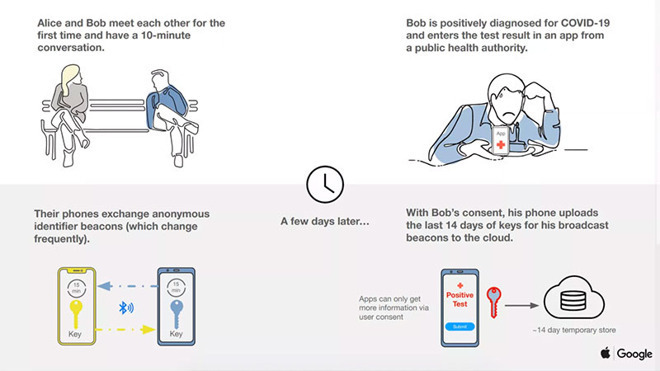
A graphic explaining how Apple and Google's system would function
On Friday, it was reported Germany and France were disagreeing with Apple and Google over security technicalities and the storage of data in the two tech giants' cross-platform system-level framework for contact tracing. Two days later, it seems that officials from one of the two countries have changed their mind to instead support similar efforts.
Germany was previously looking to create a centralized contact tracing system that relies on a central server, an approach that would allow health officials to be able to directly observe and potentially contact people suspected of carrying COVID-19. A central system approach is viewed as both a security and privacy risk by critics due to the handing over of potentially sensitive medical data to a single source, and paving the way to future state surveillance.
Apple and Google's system instead relies on a decentralized system, where contacts are stored only on user devices until they receive a positive COVID-19 diagnosis, with data only leaving the device upon that confirmation. The countries disagreed with the API's workings, and instead leaned towards the creation of a centralized monitoring system.
On Sunday, Reuters reports Germany has revised its plans to a "decentralized' approach. The country had backed the Pan-European Privacy-Preserving Proximity Tracing (PEPP-PT) initiative, which relied on a centralized system, but Chancellery Minister Helge Braun and Health Minister Jens Spahn advised of the change away from PEPP-PT to a more private method.
"We will back a decentralized architecture that will only store contacts on devices. That is good for trust," said Braun in an interview.
At this early stage, it is unclear what Germany is planning for its own system, such as whether it will be taking advantage of the Apple and Google API, or if it would work with the Decentralized Privacy-Preserving Proximity Tracing (DP-3T) effort backed by Switzerland, Austria, and Estonia.
So far, it has taken the Fraunhofer HHI research institute off the project, with officials advising the group on Saturday of its removal. "The project will be handed over and others will be able to make use of the results we have achieved so far to build a decentralized solution," said Fraunhofer HHI chief Thomas Wiegand in a memo to employees.
On the news, DP-3T stated it was "very happy to see that Germany is adopting a decentralized approach to contact tracing and we look forward to its next steps implementing such a technique in a privacy-preserving manner."
Source: Appleinsider










