 NEWS
NEWS
First a Rainbow Logo, Now a Rainbow Cube; Apple, What Does it All Mean?!
 09/09/2019
 3060
3060
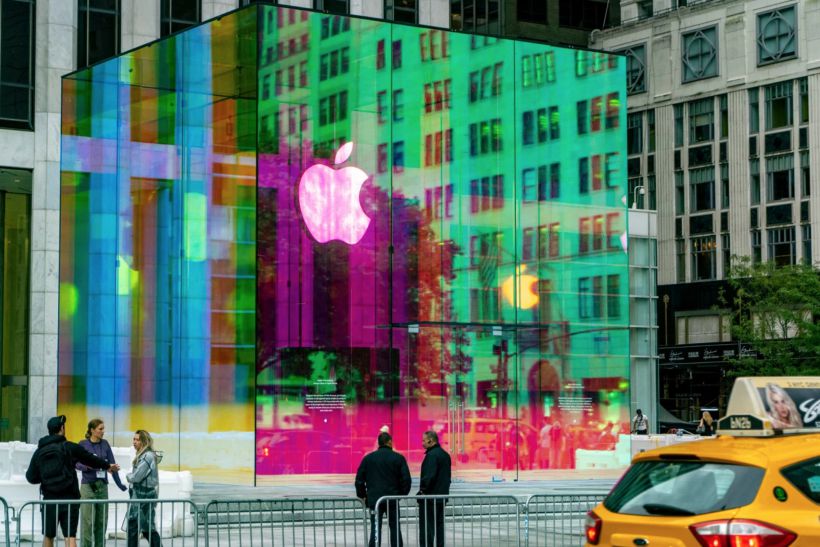
The days are ticking down until Apple’s annual fall soiree, but that doesn’t mean the rumor mill has to stop churning any time soon.
On Friday, the company gave a temporary rainbow-makeover to the iconic glass cube its Fifth Avenue store in New York City is known for to celebrate the end of a two-year renovation process. And the whole fixture bears a pretty strong resemblance to the multi-colored logo design on its invitations for the big Apple Day event.
Coincidence? Or could all these rainbows be some kind of coded message about Apple’s upcoming announcements that we’re just not seeing yet? What if it’s just a light-hearted reference to Apple’s original logo? What could it all possibly mean?
Plenty of rumors already floating around have given us a pretty good sense of the event’s upcoming announcements. A series of new iPhones to replace its current XR, XS, and XS Max models will likely be featured, though as to what Apple intends to call its 11th-generation devices (X1? 11? “Pro” something?) is still just speculation.
This rainbow-gate could all be Apple’s way of hinting that it plans to follow in its competitors’ footsteps in terms of a color scheme for its next-generation phones. The big cube boy does look similar to Samsung’s recent Note 10 series and its kaleidoscopic Aura Glow finish. Huawei has been playing around with gradient colors on its phones for years too, so there definitely seems to be a market for these chromatic designs.
Personally, I hope this whole rainbow-gate thing ends up being some kind of elaborate callback. One that references either the most ridiculously or most epically designed products Apple has ever made depending on whom you ask.
Source: Gizmodo










