
NEWS

New Apple HomeKit Platform,Users Could Receive Instant Alerts

12/13/2016

4483

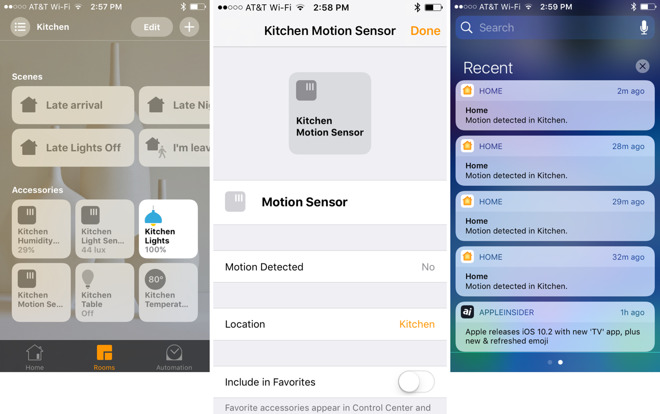
Monday's release of iOS 10.2 brought meaningful changes to Apple's HomeKit platform, giving users the ability to receive instant alerts for a variety of new connected device types in their home.

New Apple HomeKit Platform,Users Could Receive Instant Alerts


iOS 10.2 adds support for notifications from a variety of HomeKit accessories, including window coverings, occupancy, motion, door and window detectors, smoke, carbon monoxide, and water leak sensors.

By default, upon updating to iOS 10.2, users will begin receiving notifications from devices that now support the feature.

These can be enabled or disabled by opening Apple's Home app and selecting the appropriate device via firm press on 3D Touch devices, or long press on non-3D Touch devices. Tap the "Details" button at the bottom, and then scroll down to "Status and Notifications."

Here, users can decide whether the accessory will send notifications every time a sensor is triggered. This can allow the user to receive alerts no matter where they are, such as if a HomeKit smoke detector or motion sensor were triggered.
New Apple HomeKit Platform,Users Could Receive Instant Alerts


In addition, iOS 10.2 also adds the ability for HomeKit accessories to send a notification to users when an update is available. This will make it easier for users to keep their devices running the latest firmware, without the need to manually check for updates via a third-party app.


Source: appleinsider


Windows
Mac OS
iOS
Linux
3uTools
Win 64-bit For this device
V9.0 2025-11-11
Download
Win 32-bit For this device
V9.0 2025-11-11
Download
3uTools
Intel Chip How to Identify Chip Type
V9.0 2025-12-02
Download
Apple Chip
V9.0 2025-12-02
Download
How to Identify Chip Type
1.  Click the Apple icon in the top-left corner of the screen and select About This Mac.
2.  Check the Processor or Chip field to determine if it is "Intel" or "Apple".
Please use the 3uTools PC client to install the iOS client:
1、 Install either the Windows or Mac version of 3uTools on your computer
2、 Open the PC client and connect your device to the computer via USB cable
3、 After the connection is successful, wait for the computer to automatically install the mobile app for the device, or locate “Install Mobile App” on the computer and manually click to install.
3uTools
deb file
V3.01 2025-11-20
Download
rpm file
V3.01 2025-11-20
Download
Windows
Windows
iOS
iOS
Android
Android
TV
TV
3uAirPlayer
Win 64-bit For this device
V6.0.2 2025-11-19
Download
Win 32-bit For this device
V6.0.2 2025-11-19
Download
iOS Device Mirroring (No App Required)
1、 Install 3uAirPlayer on the Windows PC
2、 Open Control Center and select Screen Mirroring
3、 From the list, choose your PC to start mirroring
4、 Or connect your iOS device to the PC via USB to begin mirroring
Scan to get "3uAirPlayer" App
3uAirPlayer TV V1.0.18
2025-11-28
TV System Requirements: Android 7.0 or later
Download the TV installation package, copy it to a USB drive, insert it into your TV or set-top box, then select the file from the home screen to install.




