
NEWS

iPhone X Users Complain About Hair Stuck in the Bezel Gap And Mute Switch

01/11/2018

3798

File this in the unforeseen consequences of having a bezel-less phone with steel frames, but Apple's new iPhone X may be pulling people's hair, beards, and so on, as multiple complaints on Apple's discussion forums and random social media vents are reporting. 


The hairs seem to get stuck either in the mute switch, or in the small gap between the bezel and the display. Some units are apparently being replaced by Apple, while many others are solving the annoyance by putting a case on it, though the mute switch still remains in play sometimes. 
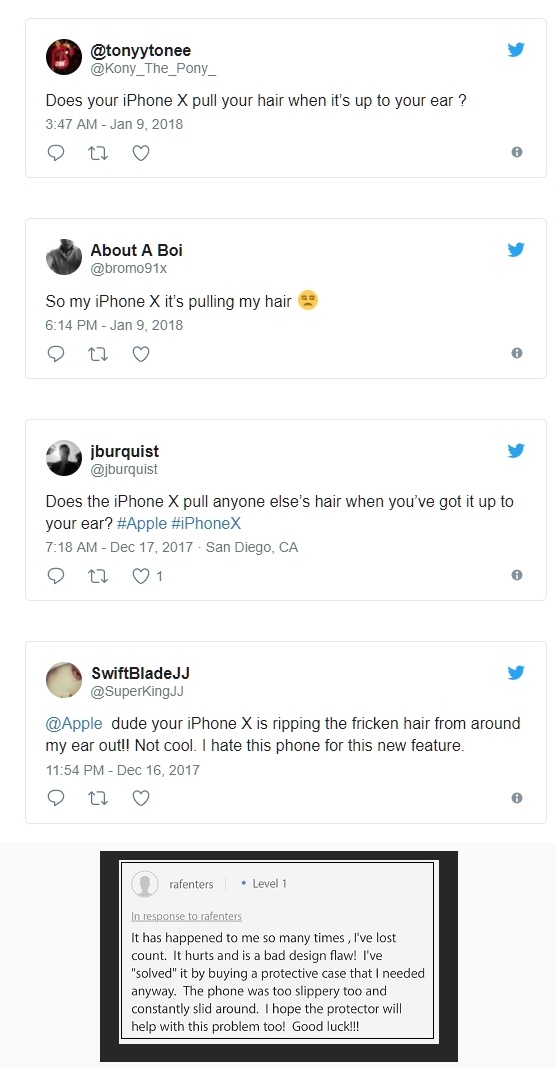
iPhone X Users Complain About Hair Stuck in the Bezel Gap And Mute Switch


We've had phones tuck at our hairs before, so it's entirely plausible that such an issue exists with the "all-screen" X, too. What to do? Well, the phone is made of glass, has slippery stainless steel sides preventing a good grip, and costs a pretty penny, so a case is a must for anyone but the complete purists. 


Or, as one of the best comments on the matter (by sean000) goes "Tap on Settings, General, Personal Grooming. Slide the setting for “Tweezers” from Auto to Manual and you should be fine."


Source: phonearena

Windows
Mac OS
iOS
Linux
3uTools
Win 64-bit For this device
V9.0 2025-11-11
Download
Win 32-bit For this device
V9.0 2025-11-11
Download
3uTools
Intel Chip How to Identify Chip Type
V9.0 2025-12-02
Download
Apple Silicon
V9.0 2025-12-02
Download
How to Identify Chip Type
1.  Click the Apple icon in the top-left corner of the screen and select About This Mac.
2.  Check the Processor or Chip field to determine if it is "Intel" or "Apple".
Please use the 3uTools PC client to install the iOS client:
1、 Install either the Windows or Mac version of 3uTools on your computer
2、 Open the PC client and connect your device to the computer via USB cable
3、 After the connection is successful, wait for the computer to automatically install the mobile app for the device, or locate “Install Mobile App” on the computer and manually click to install.
3uTools
deb file
V3.01 2025-11-20
Download
rpm file
V3.01 2025-11-20
Download
Windows
Windows
iOS
iOS
Android
Android
TV
TV
3uAirPlayer
Win 64-bit For this device
V6.0.2 2025-11-19
Download
Win 32-bit For this device
V6.0.2 2025-11-19
Download
iOS Device Mirroring (No App Required)
1、 Install 3uAirPlayer on the Windows PC
2、 Open Control Center and select Screen Mirroring
3、 From the list, choose your PC to start mirroring
4、 Or connect your iOS device to the PC via USB to begin mirroring
Scan to get "3uAirPlayer" App
3uAirPlayer TV V1.0.18
2025-11-28
TV System Requirements: Android 7.0 or later
Download the TV installation package, copy it to a USB drive, insert it into your TV or set-top box, then select the file from the home screen to install.




