 NEWS
NEWS
First Public Art Exhibition Using Apple's ARKit to Open in Miami on Dec. 5
 11/30/2017
 4006
4006
Perez Art Museum Miami will be home to the first-ever public exhibition using Apple's ARKit, leveraging iOS devices to showcase how augmented reality can be used to create new forms of expression.
The new augmented reality exhibition, powered by Apple hardware and development tools, will debut during Miami Art Week on Dec. 5. The exhibition features works by Miami-based artist Felice Grodin and was realized through a grant from the John S. and James L. Knight Foundation.
Visitors will be able to experience Grodin's digital artworks, brought to life using the official PAMM apppowered by Cuseum.
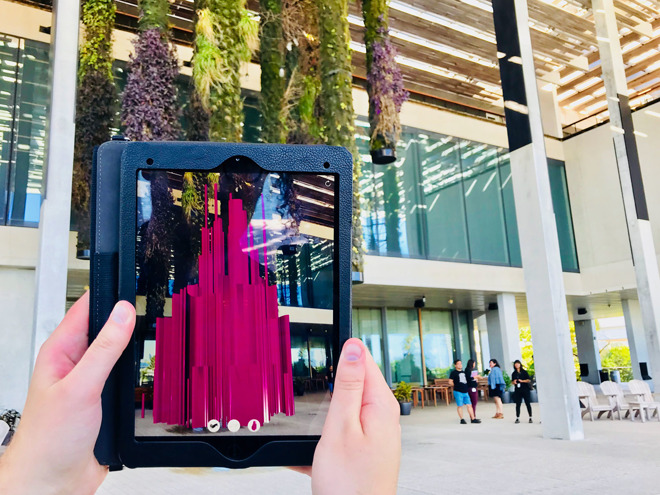
To start, there will be two AR site-specific creations, called "Mezzbug" and "Terrafish," both of which were created in 2017 with Apple's newly released ARKit tools found in iOS 11.
"Terrafish" sees PAMM's hanging gardens on the waterfront terrace filled with invasive species. With ARKit, Grodin will show nonnative jellyfish in South Florida's waters, highlighting the destructive impact of invasive species that can come about through an unstable ecosystem and climate change.
Two more pieces of digital artwork created with ARKit will debut in 2018 —the first in January, and the following one in the spring. The show will run at PAMM through April of 2018.
PAMM views Grodin's works as part of a pilot project to offer augmented reality versions of artistic expressions. They seek visitor experiences and feedback during Art Week to refine the beta project.
"It's been thrilling to collaborate with Prez Art Museum Miami and Felice Grodin to create an experience leveraging one of the most exciting new technologies," Cuseum Chief Executive Brendan Ciecko said. "Augmented reality opens up a whole new world for creative, artistic, and educational pursuits-we look forward to the evolution of 'Felice Grodin: Invasive Species' in the weeks and months to come."
Source: appleinsider










