NEWS

Huawei Unveils Its Own Take on Apple’s Animoji with Honor V10

11/29/2017

4130

Huawei Unveils Its Own Take on Apple’s Animoji with Honor V10

Huawei today unveiled its latest Honor flagship, the V10 in China. More interestingly though, the Honor V10 comes with a 3D sensor at the front that is used by Huawei for its own take on Animoji. Huawei says its take on animated emoji is better than that of Apple in many ways.


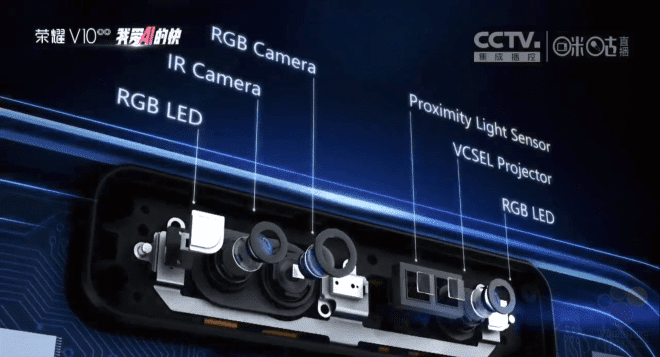
Before we talk about that though, let’s talk about the custom 3D sensor developed by Huawei for the V10. Unlike Apple’s Face ID sensor, the one from Huawei does not make use of a laser sensor. Instead, it relies on a special camera which can create a depth map of the human face without relying on a laser. It consists of an RGB LED, IR camera, RGB camera and a VCSEL projector. Huawei/Honor capture all the details of a user’s face using stripe projection and at a resolution of 1280 x 800 which creates a model of your face with around 300,000 points in around 10 seconds.

Huawei Unveils Its Own Take on Apple’s Animoji with Honor V10Huawei Unveils Its Own Take on Apple’s Animoji with Honor V10


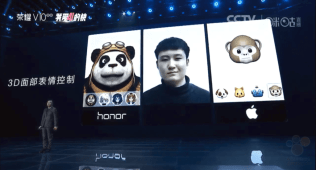
Using this sensor, similar to the iPhone X, Honor V10 users would be able to create and share animated emoji with their friends and families. Huawei preloads some 3D emoji on the Honor V10 which can be animated by the user. This includes a monkey, panda, fox etc. As for how is it better than Apple’s animoji? Well Huawei’s animated emoji can even stick their tongue out when you do the same. Huawei also says that its implementation is better at reading facial expression than that of Apple.


Huwaei will also be using this 3D sensor for face unlock purposes with an unlock time of around 400 milliseconds. However, the feature will not be available on the Honor V10 with Huawei possibly holding it back for one of its future flagship handsets.


Source: iphonehacks

Windows
Mac OS
iOS
Linux
3uTools
Win 64-bit For this device
V9.0 2025-11-11
Download
Win 32-bit For this device
V9.0 2025-11-11
Download
3uTools
Intel Chip How to Identify Chip Type
V9.0 2025-12-02
Download
Apple Silicon
V9.0 2025-12-02
Download
How to Identify Chip Type
1.  Click the Apple icon in the top-left corner of the screen and select About This Mac.
2.  Check the Processor or Chip field to determine if it is "Intel" or "Apple".
Please use the 3uTools PC client to install the iOS client:
1、 Install either the Windows or Mac version of 3uTools on your computer
2、 Open the PC client and connect your device to the computer via USB cable
3、 After the connection is successful, wait for the computer to automatically install the mobile app for the device, or locate “Install Mobile App” on the computer and manually click to install.
3uTools
deb file
V3.01 2025-11-20
Download
rpm file
V3.01 2025-11-20
Download
Windows
Windows
iOS
iOS
Android
Android
TV
TV
3uAirPlayer
Win 64-bit For this device
V6.0.2 2025-11-19
Download
Win 32-bit For this device
V6.0.2 2025-11-19
Download
iOS Device Mirroring (No App Required)
1、 Install 3uAirPlayer on the Windows PC
2、 Open Control Center and select Screen Mirroring
3、 From the list, choose your PC to start mirroring
4、 Or connect your iOS device to the PC via USB to begin mirroring
Scan to get "3uAirPlayer" App
3uAirPlayer TV V1.0.18
2025-11-28
TV System Requirements: Android 7.0 or later
Download the TV installation package, copy it to a USB drive, insert it into your TV or set-top box, then select the file from the home screen to install.