 NEWS
NEWS
Apple Buys New Zealand-based Wireless Charging Company PowerbyProxi
 10/25/2017
 3791
3791
Apple has acquired a little-known wireless charging company called PowerbyProxi for an undisclosed sum. The company, founded in 2007 by entrepreneur Fady Mishriki as a spin-out venture from the University of Auckland, specializes in small, Qi standard-compliant modules that allow wireless power transfer to larger devices like robots, drones, and medical equipment.
Apple confirmed the acquisition in a rare move for the iPhone maker, which typically issues a recycled statement that neither confirms nor denies an acquisition has taken place. Apple, in a statement from the company’s senior vice president of hardware engineering Dan Riccio, says the "team will be a great addition as Apple works to create a wireless future.”
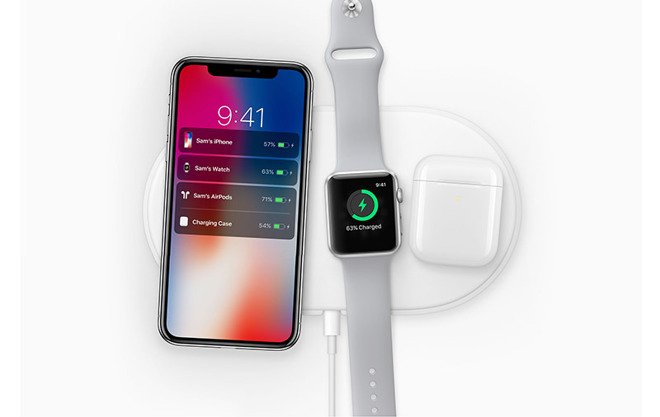
With the introduction of the iPhone 8, iPhone X, and Apple Watch Series 3 this past September, Apple laid out its vision for a simplified form of charging that works with the Qi industry standard and, at least in part, justifies its removal of the headphone jack and its investments in Bluetooth accessories. To that end, Apple is planning to release a charging mat, due out next year, called the AirPower that will simultaneously charge any glass-backed iPhone and Apple Watch alongside the wireless AirPods earbuds.
It’s unclear how exactly PowerbyProxi will help Apple in its ambitions, and whether Apple will shut down the company’s commercial operations. But the New Zealand company does make wireless charging modules capable of 100-watt power transfers, suggesting Apple could down the line integrate wireless charging technology into larger and more power-hungry devices like the MacBook. "The team and I are thrilled to join Apple,” says PowerbyPixi’s Mishriki. “There is tremendous alignment with our values, and we are excited to continue our growth in Auckland and contribute to the great innovation in wireless charging coming out of New Zealand.”
Source: theverge










