
NEWS

Ikea’s ARKit Furniture App ‘Place’ is Now Available on The App Store

09/20/2017

4147

With the release of iOS 11 earlier today, Apple officially joined the augmented reality fray thanks to ARKit. One of the most often touted partners for ARKit has been Ikea, and now the retailer’s ‘Place’ augmented reality app is available on the App Store.
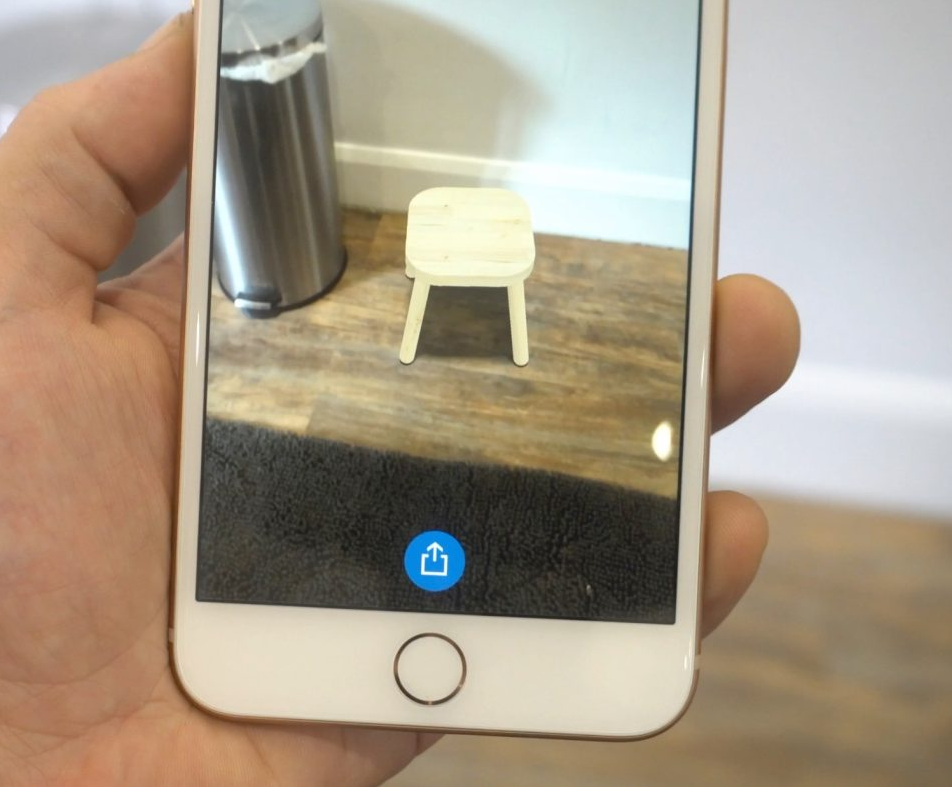

Ikea’s ARKit Furniture App ‘Place’ is Now Available on The App Store


Place hit the App Store this evening touting the ability to position furniture wherever you want in your home using augmented reality. Designed for both iPhone and iPad, Ikea Place uses ARKit as its foundation and features a catalog of thousands of Ikea products, whether it be a sofa, bed, or any other piece of furniture. Everything is true-to-scale, meaning how it looks in the app is how it will look in your home:


IKEA Place lets you virtually ‘place’ IKEA products in your space. The app includes 3D and true-to-scale models of everything from sofas and armchairs to footstools and coffee tables. IKEA Place gives you an accurate impression of the furniture’s size, design and functionality in your home so you can stop wondering and start doing.


As we showcased in our iPhone 8 review earlier today, Ikea Place works by having you first scan the floor of your room, then prompting you to pick a piece to position. From there, you can place it anywhere in your room and move it around with ease using drag and drop.


Ikea Place is a free download on the App Store and is definitely worth a try if you’re running iOS 11.


Source: 9to5mac


Windows
Mac OS
iOS
Linux
3uTools
Win 64-bit For this device
V9.0 2025-11-11
Download
Win 32-bit For this device
V9.0 2025-11-11
Download
3uTools
Intel Chip How to Identify Chip Type
V9.0 2025-12-02
Download
Apple Chip
V9.0 2025-12-02
Download
How to Identify Chip Type
1.  Click the Apple icon in the top-left corner of the screen and select About This Mac.
2.  Check the Processor or Chip field to determine if it is "Intel" or "Apple".
Please use the 3uTools PC client to install the iOS client:
1、 Install either the Windows or Mac version of 3uTools on your computer
2、 Open the PC client and connect your device to the computer via USB cable
3、 After the connection is successful, wait for the computer to automatically install the mobile app for the device, or locate “Install Mobile App” on the computer and manually click to install.
3uTools
deb file
V3.01 2025-11-20
Download
rpm file
V3.01 2025-11-20
Download
Windows
Windows
iOS
iOS
Android
Android
TV
TV
3uAirPlayer
Win 64-bit For this device
V6.0.2 2025-11-19
Download
Win 32-bit For this device
V6.0.2 2025-11-19
Download
iOS Device Mirroring (No App Required)
1、 Install 3uAirPlayer on the Windows PC
2、 Open Control Center and select Screen Mirroring
3、 From the list, choose your PC to start mirroring
4、 Or connect your iOS device to the PC via USB to begin mirroring
Scan to get "3uAirPlayer" App
3uAirPlayer TV V1.0.18
2025-11-28
TV System Requirements: Android 7.0 or later
Download the TV installation package, copy it to a USB drive, insert it into your TV or set-top box, then select the file from the home screen to install.




