 NEWS
NEWS
iOS 26.5 Features: Everything New in iOS 26.5
 05/12/2026
 1637
1637
Apple released iOS 26.5 after a few months of beta testing, and while it doesn't have the Siri features we were hoping for since those are being held until iOS 27, there are a handful of useful changes worth knowing about.
End-to-End Encryption for RCS
Support for end-to-end encryption (E2EE) for RCS messages between iPhone and Android devices is included in iOS 26.5, which means texts you send your Android friends can now have the same security as iMessages exchanged with another iPhone user.
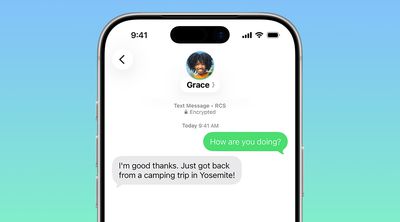
Encrypted RCS messages are available on supported carriers and will roll out over time, and for conversations to be encrypted, both the receiver and the sender must use a carrier that supports the latest version of RCS.
End-to-end encryption is on by default, and there is a toggle for it in the Messages section of the Settings app. Encrypted messages are denoted with a small lock symbol.
Wallpaper
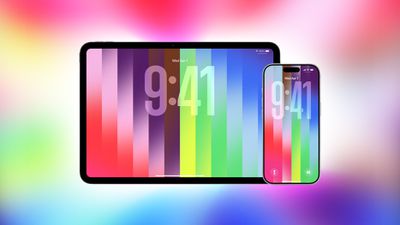
iOS 26.5 includes a colorful new Pride Luminance wallpaper that can be customized with multiple color options.
Maps App
The Maps app includes a new Suggested Places feature that recommends places to visit based on your recent searches and what's trending nearby.
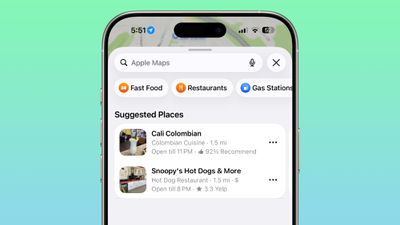
iOS 26.5 also laid the groundwork for ads in the Maps app, but ads are not live yet.
EU Changes for Third-Party Wearables
To comply with the EU's Digital Markets Act, Apple is letting third-party wearables access some features that have historically been limited to the Apple Watch and AirPods.
Here's what's new:
- Proximity pairing - Third-party earbuds are able to use proximity pairing to connect to an iPhone, similar to the AirPods. Bringing a set of earbuds that support the feature near an iPhone will initiate an AirPods-like one-tap pairing process, so third-party wearables like earbuds will no longer require multiple steps to pair.
- iPhone notifications - Third-party accessories like smartwatches are able to receive notifications from the iPhone, and users are able to view and react to them. Interactive notifications from the iPhone have been limited to the Apple Watch, while third-party wearables have only been able to display read-only notifications. Notifications can only be forwarded to a single connected device at a time, so turning on notifications for a third-party wearable disables notifications on Apple Watch.
- Live Activities - Live Activities from the iPhone can be displayed on a third-party wearable, similar to how Live Activities are shown on an Apple Watch.
Accessory makers will need to add support for the interoperability updates, so they may not be available right away. Third-party TVs, smartwatches, and headphones will be able to use the features.
Expanded support for third-party wearables is limited to iPhone users located in the European Union with an Apple account set to an EU country or region.
iPhone to Android Transfer
When switching from an iPhone to an Android device, there is a new setting for selecting which message attachments to transfer over. There are options for All, 1 year, or 30 days.
Apple Books
There are mentions of new awards in the Apple Books app, which are likely for
year-end wrap-ups.
Keyboard Layout
iOS 26.5 has an Inuktitut keyboard layout option.
Security Fixes
iOS 26.5 addresses more than 50 vulnerabilities, so it's a good idea to update as soon as possible to get the latest protections. None of the vulnerabilities are known to have been actively exploited.
Source: Macrumors










