NEWS

Apple Giving iOS 15 Users Choice Between New And Old Safari Design

08/18/2021

3613

Apple Giving iOS 15 Users Choice Between New And Old Safari Design


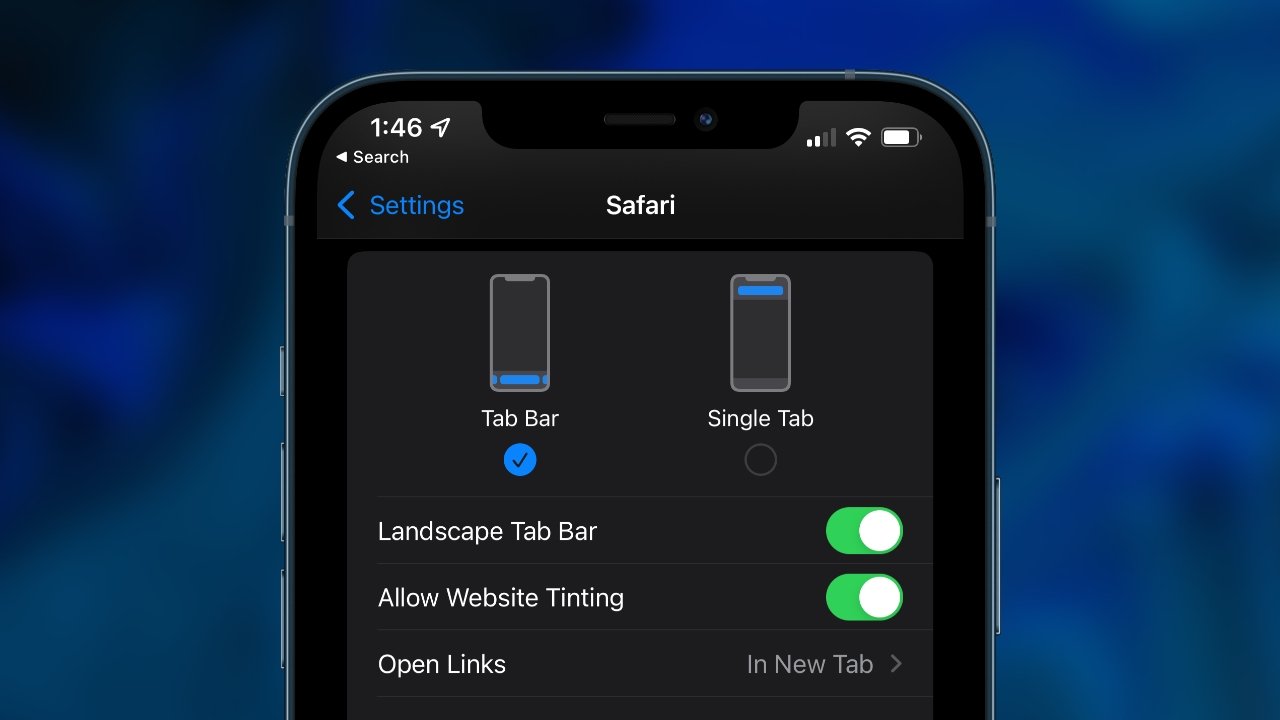
The sixth developer beta for iOS 15 has added a toggle that reverses Apple's Safari address bar design to the iOS 14 top-bar style.


When Apple introduced the upcoming iOS and macOS operating systems at WWDC, it showed a big redesign for Safari across platforms. However, Apple has since slowly walked back the controversial design with tweaks and user-accessible toggles.


The latest developer beta for iOS 15 adds a toggle to Safari settings that brings back the old design language. Users can navigate to the Settings app, Safari, then select the top or bottom style as desired.


A similar toggle had been added to macOS Monterey and iPadOS 15 as well. Apple has received a lot of pushback from beta testers over the new design, and it seems it is listening.


Apple hasn't made any official announcement regarding the new Safari design. It appears the toggle is permanent, but Apple could remove it once it is satisfied with the final Safari redesign.


Apple has given users some agency over its more controversial choices in the past. For example, some users prefer to toggle off "natural scrolling" on the Mac despite being in the reverse direction of touch-enabled scrolling.


Source: Appleinsider

Windows
Mac OS
iOS
Linux
3uTools
Win 64-bit For this device
V9.0 2025-11-11
Download
Win 32-bit For this device
V9.0 2025-11-11
Download
3uTools V3.18
2025-09-18
Please use the 3uTools PC client to install the iOS client:
1、 Install either the Windows or Mac version of 3uTools on your computer
2、 Open the PC client and connect your device to the computer via USB cable
3、 After the connection is successful, wait for the computer to automatically install the mobile app for the device, or locate “Install Mobile App” on the computer and manually click to install.
3uTools
deb file
V3.01 2025-11-20
Download
rpm file
V3.01 2025-11-20
Download
Windows
Windows
iOS
iOS
Android
Android
TV
TV
3uAirPlayer
Win 64-bit For this device
V6.0.2 2025-11-19
Download
Win 32-bit For this device
V6.0.2 2025-11-19
Download
iOS Device Mirroring (No App Required)
1、 Install 3uAirPlayer on the Windows PC
2、 Open Control Center and select Screen Mirroring
3、 From the list, choose your PC to start mirroring
4、 Or connect your iOS device to the PC via USB to begin mirroring
Scan to get "3uAirPlayer" App
3uAirPlayer TV V1.0.18
2025-11-28
TV System Requirements: Android 7.0 or later
Download the TV installation package, copy it to a USB drive, insert it into your TV or set-top box, then select the file from the home screen to install.