
TUTORIALS

Cowbell Displays Your Battery Percentage in Low Power Mode Toggle

05/10/2018

5494

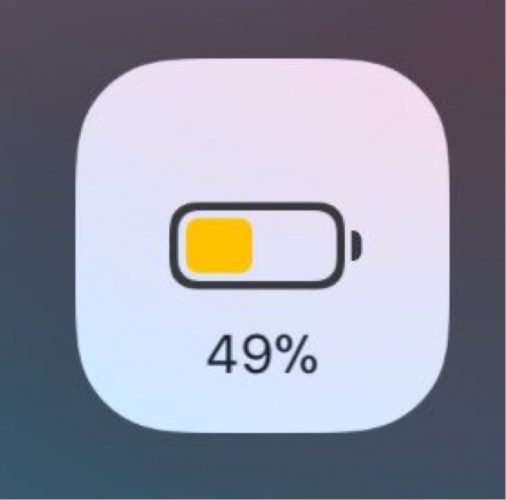
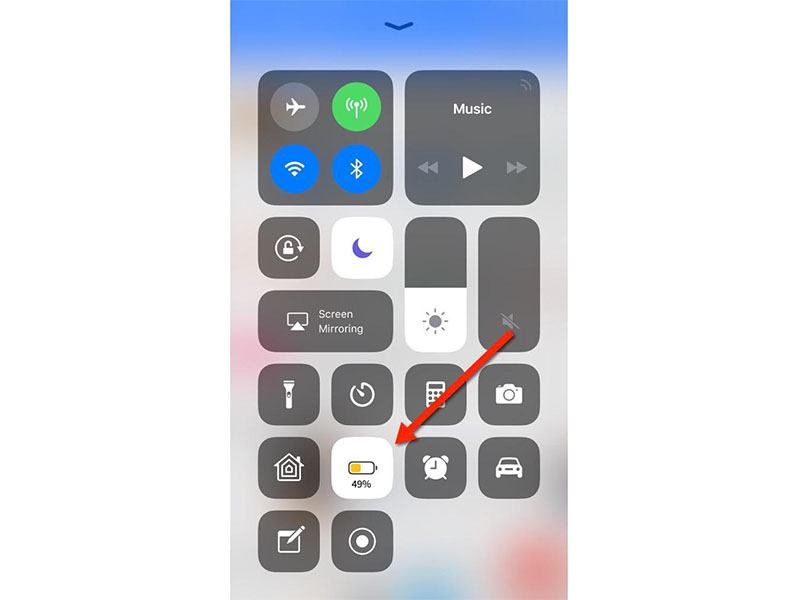
Cowbell is a new free jailbreak tweak by iOS developer LaughingQuoll that displays your device’s current battery level in the Low Power Mode toggle button located inside of Control Center in iOS 11.

Cowbell Displays Your Battery Percentage in Low Power Mode Toggle


Shown above, you can see how the text string indicating your current battery level percentage appears just below the glyph shown on the toggle button.


Cowbell’s release was an immediate answer to a tweak request posted by Reddit user burkybang on /r/jailbreak, but its functionality is a bit redundant since the same information is already displayed in the Status Bar above the toggle.

Cowbell Displays Your Battery Percentage in Low Power Mode Toggle


Worthy of note, the tweak doesn’t just display the numeric battery level percentage, but the battery glyph actually animates to match the indicator in your Status Bar. This subtle animation symbolizes intricate attention to detail, which Apple has been historically known for.


If you’d like to give Cowbell a try, then you can grab the tweak in its current form for free from Cydia’s Packix repository. The tweak doesn’t have any options to configure and works on all jailbroken iOS 11 devices.


In addition, LaughingQuoll published the tweak’s source code on GitHub for anyone who might be interested in learning what makes it work behind the scenes.


Windows
Mac OS
iOS
Linux
3uTools
Win 64-bit For this device
V9.01 2025-12-27
Download
Win 32-bit For this device
V9.01 2025-12-27
Download
3uTools
Intel Chip How to Identify Chip Type
V9.01 2025-12-31
Download
Apple Silicon
V9.01 2025-12-31
Download
How to Identify Chip Type
1.  Click the Apple icon in the top-left corner of the screen and select About This Mac.
2.  Check the Processor or Chip field to determine if it is "Intel" or "Apple".
Please use the 3uTools PC client to install the iOS client:
1、 Install either the Windows or Mac version of 3uTools on your computer
2、 Open the PC client and connect your device to the computer via USB cable
3、 After the connection is successful, wait for the computer to automatically install the mobile app for the device, or locate “Install Mobile App” on the computer and manually click to install.
3uTools
deb file
V3.01 2025-11-20
Download
rpm file
V3.01 2025-11-20
Download
Windows
Windows
iOS
iOS
Android
Android
TV
TV
3uAirPlayer
Win 64-bit For this device
V6.0.2 2025-11-19
Download
Win 32-bit For this device
V6.0.2 2025-11-19
Download
iOS Device Mirroring (No App Required)
1、 Install 3uAirPlayer on the Windows PC
2、 Open Control Center and select Screen Mirroring
3、 From the list, choose your PC to start mirroring
4、 Or connect your iOS device to the PC via USB to begin mirroring
Scan to get "3uAirPlayer" App
3uAirPlayer TV V1.0.18
2025-11-28
TV System Requirements: Android 7.0 or later
Download the TV installation package, copy it to a USB drive, insert it into your TV or set-top box, then select the file from the home screen to install.



