 TUTORIALS
iOS 11.1.2 Jailbreak FAQ: Here’s What You Need To Know
 12/11/2017
 8131
8131

The world of jailbreaking has been responsible for producing a roller coaster of mixed emotions over the last few days. Things are never what you could exactly call “run of the mill” where jailbreaking is concerned but there has been a genuine feeling of enthusiasm this last week due to a series of announcements.
Now, Jonathan Levin, who recently announced the existence of what he called a “jailbreak toolkit,”has published some new information about the current state of an iOS 11 jailbreak, which is enlightening but not exactly the news jailbreakers wanted to hear after a week of presumed positivity.
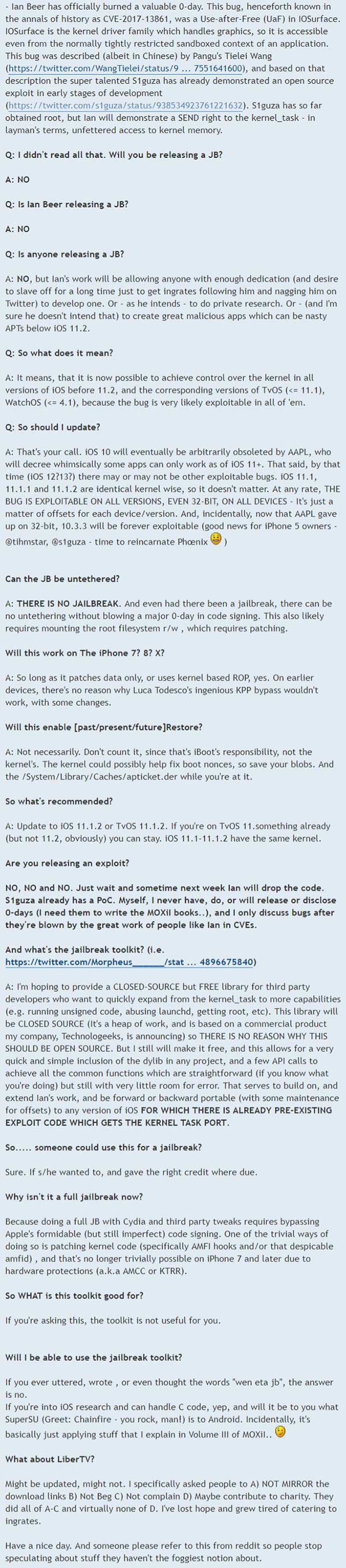
First of all, Levin has confirmed that Ian Beer of Google’s Project Zero team has “officially burned a valuable 0-day,” existing in IOSurface which handles graphics at a kernel level. The public nature of this bug means that it has been fixed and patched with Apple’s release of iOS 11.2, which is currently being installed on devices all over the globe. So, now that CVE-2017-13861 is done and dusted in the most recent versions of Apple’s iOS firmware, where does that leave us from an iOS 11.1.2 and below perspective?
The good news is that these recent work and discoveries mean that it is now possible to achieve control over the kernel in all versions of iOS prior to 11.2. And this likely applies to tvOS and watchOS, too. It does also mean that if anyone does pop-up in the community who has the technical skills and abilities to piece all of these things together and to dedicate the time needed, then it is possible that we could see some announcements in the future regarding a public iOS 11.1.2 jailbreak.
One thing that is immediately evident, and actually important here, from Levin’s post, is that the community appears to be causing its own problems and pushing the talented developers and researchers away from the scene. It’s no coincidence that multiple figureheads in the community are now starting to reference the “wen jb eta” brigade more frequently, referencing the fact that they are bombarded on a daily basis by what Levin calls “ingrates”.
You get the sense that something needs to change in the attitude of this community before all of the capable hackers and researcher take their work elsewhere or underground.
Levin’s full FAQ on the whole situation is embedded below:
Source: NewOSXBook










