
TUTORIALS

DarkAppleStore (Free): Makes The Apple Store App’s Tab Bar Dark

10/31/2017

5328

If you use the App Store application, the new DarkAppleStore tweak will be useful, since it applies a dark blur to the translucent tab bar at the bottom of the application.


The tweak not only makes the tab bar dark, it also maintains a translucency effect so that you can distinguish the functions of the application interface behind the tab bar when scrolling up or down, providing a good user experience.


This tweak does not add any options to configure, so you can use it immediately after installation.


The DarkAppleStore tweak is compatible with all jailbroken iDevices running on iOS 10 and works only with the Apple Store application, which you can download free of charge from the App Store.
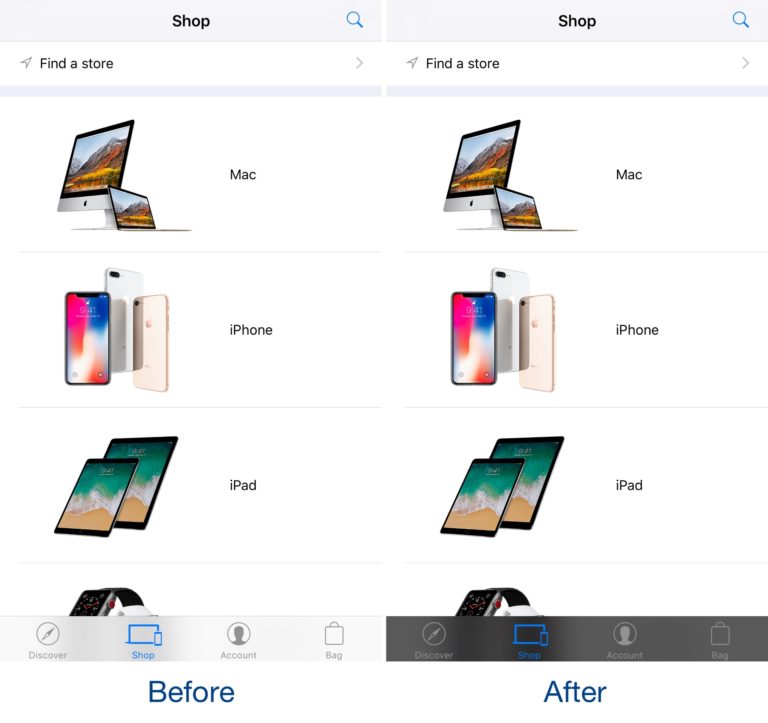
                               

DarkAppleStore (Free): Makes The Apple Store App’s Tab Bar Dark


If you’re interested in trying DarkAppleStore, you can download the tweak for free from Cydia. It’s not available in any public repositories, so you’ll have to follow these steps to get it:


Step1: Launch the Cydia app and go to the Sources.


Step2: Click Edit and then click Add.


Step3: In the text field of the pop-up that appears, type in the following repository URL: http://cydiageek.yourepo.com 


Step4: Click Add Source and wait for the repository to load into Cydia.


After completing all four steps, you should be able to find and install DarkAppleStore by searching Cydia or checking the Changes tab once the app is done “Reloading Data.”



Windows
Mac OS
iOS
Linux
3uTools
Win 64-bit For this device
V9.0 2025-11-11
Download
Win 32-bit For this device
V9.0 2025-11-11
Download
3uTools
Intel Chip How to Identify Chip Type
V9.0 2025-12-02
Download
Apple Silicon
V9.0 2025-12-02
Download
How to Identify Chip Type
1.  Click the Apple icon in the top-left corner of the screen and select About This Mac.
2.  Check the Processor or Chip field to determine if it is "Intel" or "Apple".
Please use the 3uTools PC client to install the iOS client:
1、 Install either the Windows or Mac version of 3uTools on your computer
2、 Open the PC client and connect your device to the computer via USB cable
3、 After the connection is successful, wait for the computer to automatically install the mobile app for the device, or locate “Install Mobile App” on the computer and manually click to install.
3uTools
deb file
V3.01 2025-11-20
Download
rpm file
V3.01 2025-11-20
Download
Windows
Windows
iOS
iOS
Android
Android
TV
TV
3uAirPlayer
Win 64-bit For this device
V6.0.2 2025-11-19
Download
Win 32-bit For this device
V6.0.2 2025-11-19
Download
iOS Device Mirroring (No App Required)
1、 Install 3uAirPlayer on the Windows PC
2、 Open Control Center and select Screen Mirroring
3、 From the list, choose your PC to start mirroring
4、 Or connect your iOS device to the PC via USB to begin mirroring
Scan to get "3uAirPlayer" App
3uAirPlayer TV V1.0.18
2025-11-28
TV System Requirements: Android 7.0 or later
Download the TV installation package, copy it to a USB drive, insert it into your TV or set-top box, then select the file from the home screen to install.




