TUTORIALS

iOS 12 – iOS 12.1.2 Compatible Jailbreak Tweaks

02/11/2019

10788

iOS 12 – iOS 12.1.2 Compatible Jailbreak Tweaks


While there being still no public iOS 12.1.2 jailbreak release, advanced users can at least use the developer-focused rootlessJB for iOS 12 – iOS 12.1.2 to jailbreak their iPhone or iPad. Despite the SSH-based jailbreak being developer centric in nature and having quite a few restrictions, it has not stopped interested iPhone and iPad users from jumping the gun and using it to jailbreak their device. And once jailbroken, these users are going to look for some useful jailbreak tweaks.


The release of rootlessJB has allowed many developers to run and check whether their jailbreak tweak is compatible with iOS 12 or not. It has also allowed some to make the necessary changes to ensure their tweak works properly on the latest version of the iOS while other tweaks are working as it is. But that does not mean that all existing tweaks are going to work just fine under iOS 12.  That’s because its a completely new version of iOS and developers are going to have to update their tweaks to ensure it is compatible with it. Plus, rootlessJB is not your typical jailbreak since it does not bypass CoreTrust.


Nonetheless, if you have just jailbroken your iPhone or iPad running iOS 12 – iOS 12.1.2 and are looking to try out some tweaks, check out the below list of compatible tweaks.


iOS 12.1.2 Compatible Jailbreak Tweaks
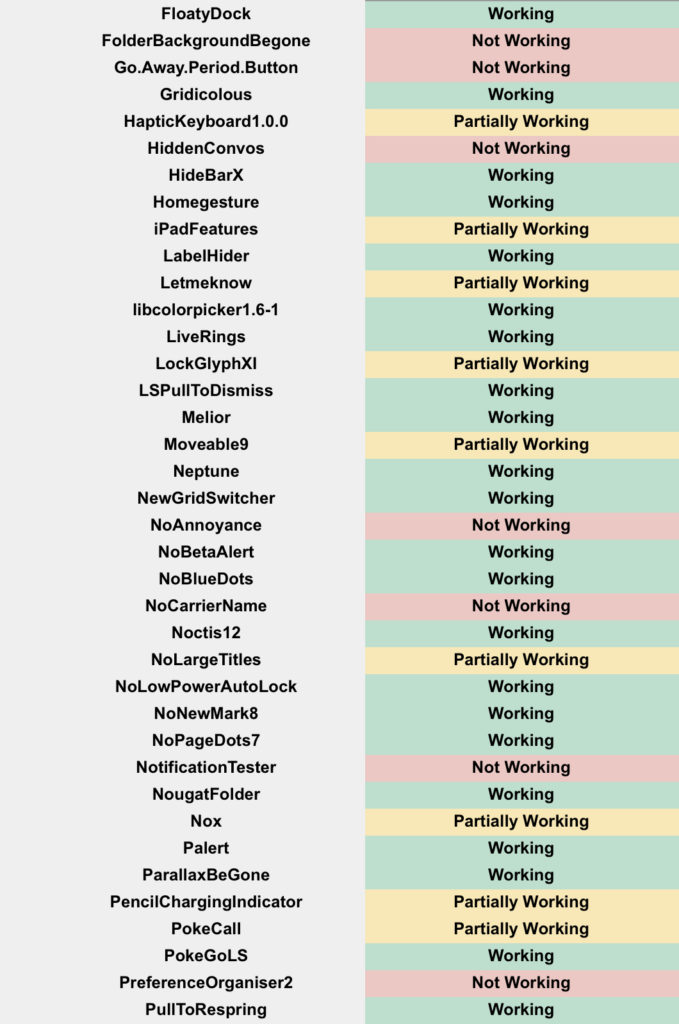

iOS 12 – iOS 12.1.2 Compatible Jailbreak Tweaks
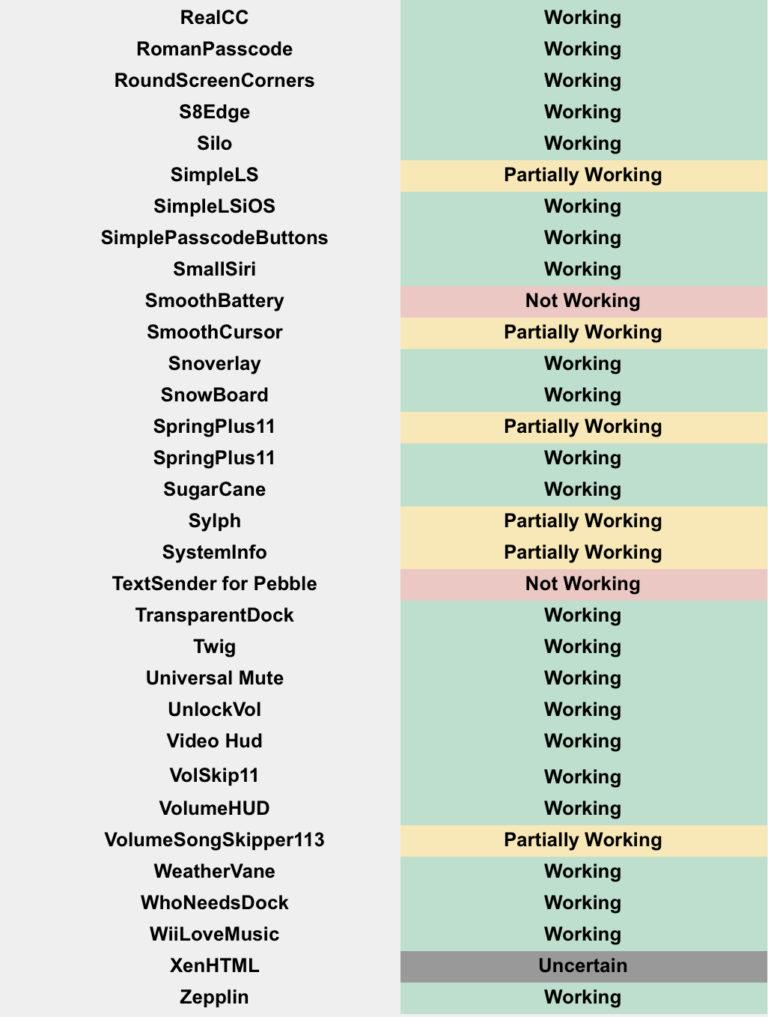
iOS 12 – iOS 12.1.2 Compatible Jailbreak Tweaks

Windows
Mac OS
iOS
Linux
3uTools
Win 64-bit For this device
V9.0 2025-11-11
Download
Win 32-bit For this device
V9.0 2025-11-11
Download
3uTools
Intel Chip How to Identify Chip Type
V9.0 2025-12-02
Download
Apple Silicon
V9.0 2025-12-02
Download
How to Identify Chip Type
1.  Click the Apple icon in the top-left corner of the screen and select About This Mac.
2.  Check the Processor or Chip field to determine if it is "Intel" or "Apple".
Please use the 3uTools PC client to install the iOS client:
1、 Install either the Windows or Mac version of 3uTools on your computer
2、 Open the PC client and connect your device to the computer via USB cable
3、 After the connection is successful, wait for the computer to automatically install the mobile app for the device, or locate “Install Mobile App” on the computer and manually click to install.
3uTools
deb file
V3.01 2025-11-20
Download
rpm file
V3.01 2025-11-20
Download
Windows
Windows
iOS
iOS
Android
Android
TV
TV
3uAirPlayer
Win 64-bit For this device
V6.0.2 2025-11-19
Download
Win 32-bit For this device
V6.0.2 2025-11-19
Download
iOS Device Mirroring (No App Required)
1、 Install 3uAirPlayer on the Windows PC
2、 Open Control Center and select Screen Mirroring
3、 From the list, choose your PC to start mirroring
4、 Or connect your iOS device to the PC via USB to begin mirroring
Scan to get "3uAirPlayer" App
3uAirPlayer TV V1.0.18
2025-11-28
TV System Requirements: Android 7.0 or later
Download the TV installation package, copy it to a USB drive, insert it into your TV or set-top box, then select the file from the home screen to install.