TUTORIALS
iOS 11.4 Compatible Jailbreak Tweaks On Cydia
 07/12/2018
 7667
7667
It has, unfortunately, been a long time since anyone was able to install any jailbreak tweak that was available via Cydia and be absolutely sure that it would work without a hitch, no matter which version of iOS they had installed.
That’s simply not viable anymore and that’s a byproduct of not only Apple’s continuing the quest to make jailbreaking more difficult and less worthwhile, but also a sign of just how complicated iOS has become behind the scenes.
There’s a lot going on under the hood, and when you try to fiddle with that by installing tweaks, all bets are very much off.
With the latest Electra jailbreak now in the hands of a community that loves to tweak, there are plenty of questions being asked and many of them relate to which tweaks can be installed without too much fuss. Understandably, most of the attention right now is on iOS 11.3.1 but with confirmation received that iOS 11.4 beta 3 can also be jailbroken, that’s now been thrown into the mix too.
Thankfully, there is a way to find out whether your favorite jailbreak tweak is a-ok for use depending on which version of iOS you have installed and importantly, because it’s being compiled by the folks over at Electra, then we can be fairly confident in what we are being told.
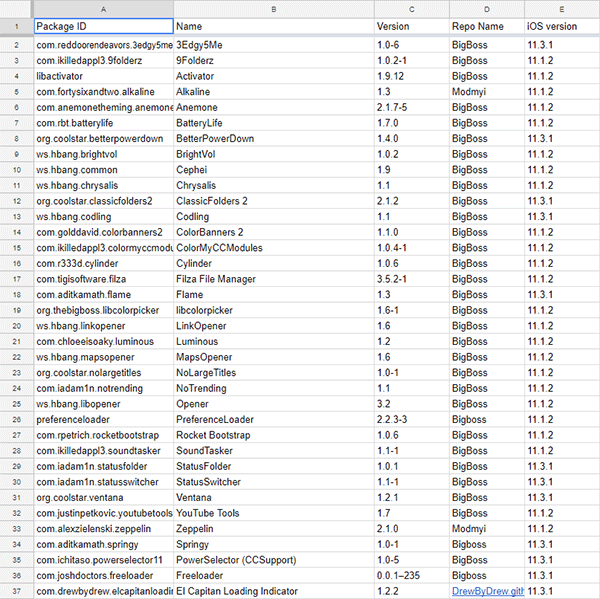
The team is currently keeping a Google Sheets spreadsheet updated so that’s undoubtedly the best place to keep up to speed with where things stand, but for right now, there are a handful of jailbreak tweaks that are compatible with iOS 11.3.1 and indeed that third beta release of iOS 11.4.
Be sure to check this list out before you start installing your favorite tweaks!