 TUTORIALS
Customize the Look and Feel of Your Dock with Marina
 03/02/2018
 7238
7238
Customizing the application Dock has always been a favorite past-time for jailbreakers, and a new free tweak dubbed Marina by iOS developer CydiaGeek takes that notion into consideration.
Out of the box, Marina lets you customize the number of apps in your Dock and change how it displays on your Home Screen. Imbued with these abilities, you can make your dock both more functional and better-looking than it would be on a stock device.
After installing Marina, you'll find a dedicated preference pane in the Settings app for configuring a bevy of Dock-related options to your liking:
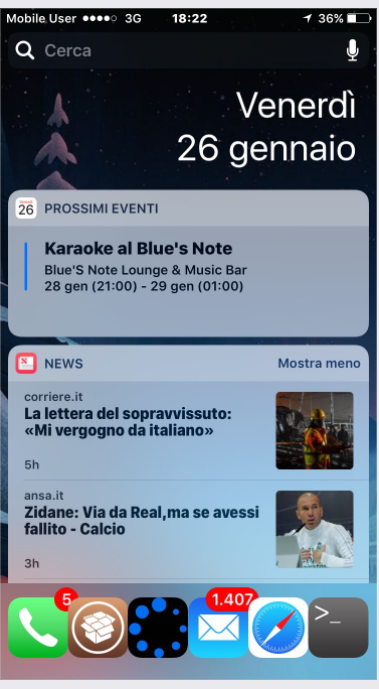
Compatible with iOS 8, 9 and 10 (tested on iPhone 5 iOS 10.3.3, iPhone 5S iOS 8.3, iPhone 6 iOS 8.3 and 9.0.2, iPhone 6S iOS 10.2 and iPhone 7 running iOS 10.1.1).
Here, you'll discover options like:
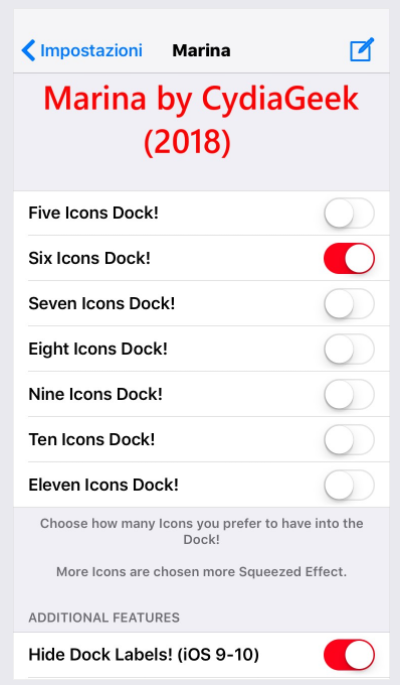
Enable five to eleven icons in the Dock
Hide labels from the Dock icons
Hide the Dock's background
Hide the Dock in its entirety
Hide the paging dots above the Dock
Force the Dock to appear on the Today page of the Home screen
Move the Dock up slightly
Put the Dock at the top of the screen (beta and only partially-working)
Enlarge the space dedicated to Dock icons
After configuring the tweak, you can use the respring button at the bottom of the preference pane to save your changes.
Compared to countless other Dock-related tweaks that are available in Cydia today, Marina offers a wider variety of customization options to let you get the look and feel you're after. Personally, I like having five icons in my dock and accessing it from the Today page, but everyone uses their device differently.
You can download it for free from Cydia's BigBoss repository. The tweak works on all jailbroken iOS 8, 9, and 10 devices, and iOS 11 support is coming soon.
Source: idownloadblog










