
TUTORIALS

Swiper – iPhone X Style Lock Screen for iPhone 7 and Older Devices

01/16/2018

10523

iPhone X has been hogging all the limelight lately and for all the right reasons. Ever since it debuted on September 12, jailbreakers have been itching to get any of its features on older devices.


One of the main innovations in iPhone X is the new lock screen design. This is where this new jailbreak tweak comes in.


Swiper Cydia tweak ports the iPhone X lock screen design to all iPhone, iPad, and iPod devices running iOS 10. It is developed by tweak developer Artikus HG.


Here’s how it looks like in action.
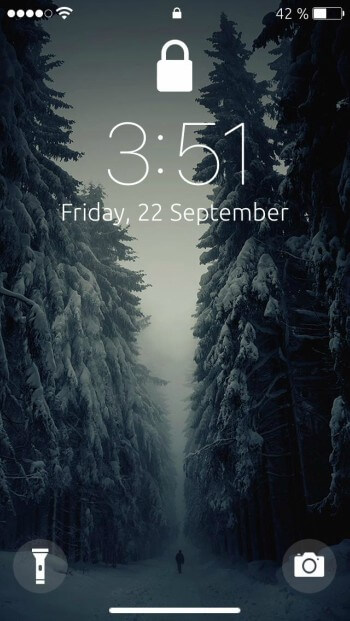

Swiper – iPhone X Style Lock Screen for iPhone 7 and Older Devices


To unlock your device, you simply need to press the swiper and then swipe up. Remember, it doesn’t work if you already have a passcode set.


The developer also suggests that you remove the padlock present in the lock screen status bar. To remove the intrusive icon, simply install the NoLSPadLock tweak from BigBoss repository.


How to download Swiper Tweak:


This is a must-have for all users who would like to get a taste of iPhone X on older devices. Highly recommended.


Hopefully, the developer will release it on a Cydia repository properly in the future.


Swiper is available for download as a deb file here for free. It is compatible with iOS 10. Do you want use iPhone X UI on older iPhone? Check FluidEnabler.


Windows
Mac OS
iOS
Linux
3uTools
Win 64-bit For this device
V9.0 2025-11-11
Download
Win 32-bit For this device
V9.0 2025-11-11
Download
3uTools
Intel Chip How to Identify Chip Type
V9.0 2025-12-02
Download
Apple Silicon
V9.0 2025-12-02
Download
How to Identify Chip Type
1.  Click the Apple icon in the top-left corner of the screen and select About This Mac.
2.  Check the Processor or Chip field to determine if it is "Intel" or "Apple".
Please use the 3uTools PC client to install the iOS client:
1、 Install either the Windows or Mac version of 3uTools on your computer
2、 Open the PC client and connect your device to the computer via USB cable
3、 After the connection is successful, wait for the computer to automatically install the mobile app for the device, or locate “Install Mobile App” on the computer and manually click to install.
3uTools
deb file
V3.01 2025-11-20
Download
rpm file
V3.01 2025-11-20
Download
Windows
Windows
iOS
iOS
Android
Android
TV
TV
3uAirPlayer
Win 64-bit For this device
V6.0.2 2025-11-19
Download
Win 32-bit For this device
V6.0.2 2025-11-19
Download
iOS Device Mirroring (No App Required)
1、 Install 3uAirPlayer on the Windows PC
2、 Open Control Center and select Screen Mirroring
3、 From the list, choose your PC to start mirroring
4、 Or connect your iOS device to the PC via USB to begin mirroring
Scan to get "3uAirPlayer" App
3uAirPlayer TV V1.0.18
2025-11-28
TV System Requirements: Android 7.0 or later
Download the TV installation package, copy it to a USB drive, insert it into your TV or set-top box, then select the file from the home screen to install.



