
TUTORIALS

Whether Cydia Packages Work on Your Version of iOS?

12/29/2017

4326

If you’ve ever looked at an older jailbreak tweak in Cydia and wondered whether it’d work on your version of iOS, then a new free release called tweakCompatible by iOS developer treAson might be of use to you.


This tweak lets you confirm whether a tweak works with your version of iOS before you install it on your device. In doing so, you can avoid potential conflicts that might cause problems with the stability of your jailbreak down the line.

Whether Cydia Packages Work on Your Version of iOS?


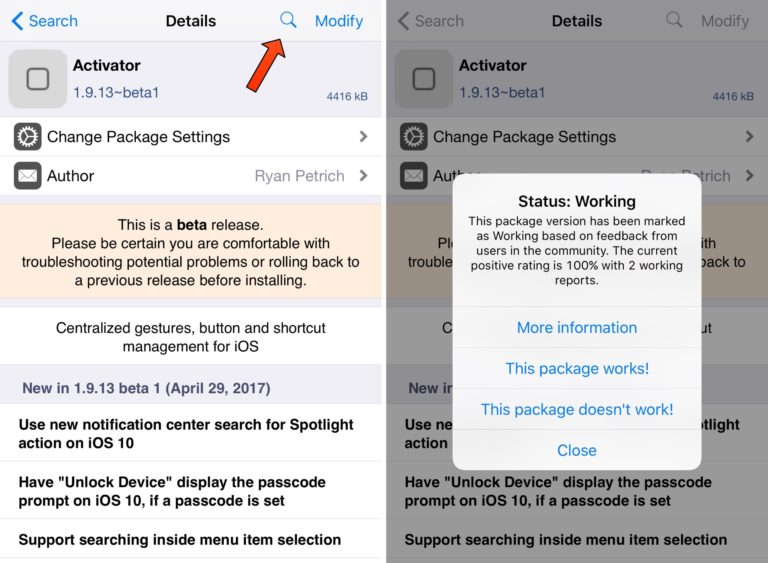
In the case of Activator in our example above, we can see that it works just fine on our iOS 10.2 device that we’re viewing it from.


As for the options, tweakCompatible relies on crowdsourced information to alert the rest of the community to potential conflicts before installing. We can tap on the “This package works!” button if we can confirm that the tweak works, or alternatively the “This package doesn’t work!” button if we can’t get it to work.


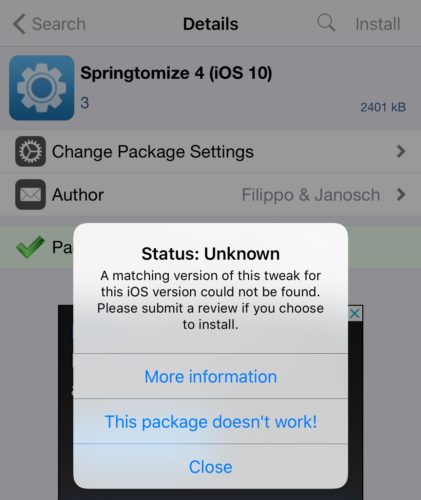
tweakCompatible is still new, so not very many people have contributed to its polls yet. With that in mind, some tweaks in Cydia don’t currently have ratings:

Whether Cydia Packages Work on Your Version of iOS?


If you’re uncertain or want to see what versions that a jailbreak tweak does work on, then the full tweakCompatible database can be found on GitHub.


For the most part, tweakCompatible has the potential to be a useful tweak, which it’s available for free from Cydia’s BigBoss repository. The tweak works with all jailbroken iOS 10 devices.


Source: idownloadblog

Windows
Mac OS
iOS
Linux
3uTools
Win 64-bit For this device
V9.0 2025-11-11
Download
Win 32-bit For this device
V9.0 2025-11-11
Download
3uTools
Intel Chip How to Identify Chip Type
V9.0 2025-12-02
Download
Apple Silicon
V9.0 2025-12-02
Download
How to Identify Chip Type
1.  Click the Apple icon in the top-left corner of the screen and select About This Mac.
2.  Check the Processor or Chip field to determine if it is "Intel" or "Apple".
Please use the 3uTools PC client to install the iOS client:
1、 Install either the Windows or Mac version of 3uTools on your computer
2、 Open the PC client and connect your device to the computer via USB cable
3、 After the connection is successful, wait for the computer to automatically install the mobile app for the device, or locate “Install Mobile App” on the computer and manually click to install.
3uTools
deb file
V3.01 2025-11-20
Download
rpm file
V3.01 2025-11-20
Download
Windows
Windows
iOS
iOS
Android
Android
TV
TV
3uAirPlayer
Win 64-bit For this device
V6.0.2 2025-11-19
Download
Win 32-bit For this device
V6.0.2 2025-11-19
Download
iOS Device Mirroring (No App Required)
1、 Install 3uAirPlayer on the Windows PC
2、 Open Control Center and select Screen Mirroring
3、 From the list, choose your PC to start mirroring
4、 Or connect your iOS device to the PC via USB to begin mirroring
Scan to get "3uAirPlayer" App
3uAirPlayer TV V1.0.18
2025-11-28
TV System Requirements: Android 7.0 or later
Download the TV installation package, copy it to a USB drive, insert it into your TV or set-top box, then select the file from the home screen to install.




