TUTORIALS

Check Out All 240 New iOS 11.1 Emojis Right Here

11/01/2017

4972

Check Out All 240 New iOS 11.1 Emojis Right Here


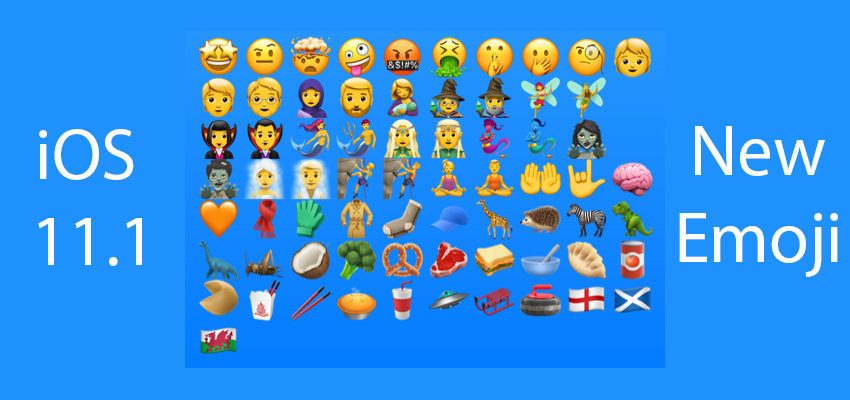
Apple has been teasing this new round of emoji releases for weeks now, and the release of the software update now brings them to the devices of all users. Everyone will have their favorites out of the 240 new additions, but I’m a fan of anything that involves dinosaurs, so without a doubt, my top picks would be the new jurassic period-inspired offerings. Fans of mermaids can enjoy a whole host of new emoji relating to the finned wonders, and those from England, Scotland and Wales also have new emoji flags to call their own. We also found a new emoji that reminds us ever so much of movie star Burt Reynolds, so see if you can pick that one out and come back to us!


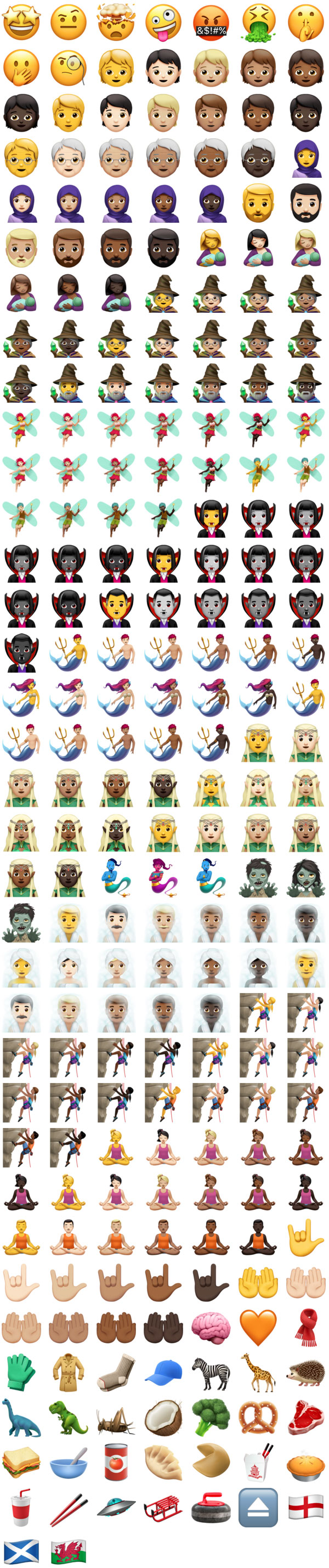
iOS 11.1 was released on October 31, 2017 and includes 240 new emojis including Giraffe, Face Vomiting, Genie, Sauropod (dinosaur) and more. A number of existing emojis changed in this update, such as Honeybee, Ram, and Tumbler Glass.


These emoji updates are included as part of iOS 11.1 for iPhone and iPad, macOS High Sierra 10.13.1 for Mac, watchOS 4.1 for Apple Watch and tvOS 11.1 for Apple TV, covering the entire suite of Apple software platforms and releases.


You can view all 240 new and updated emoji in the image below.

Check Out All 240 New iOS 11.1 Emojis Right Here


Windows
Mac OS
iOS
Linux
3uTools
Win 64-bit For this device
V9.0 2025-11-11
Download
Win 32-bit For this device
V9.0 2025-11-11
Download
3uTools
Intel Chip How to Identify Chip Type
V9.0 2025-12-02
Download
Apple Chip
V9.0 2025-12-02
Download
How to Identify Chip Type
1.  Click the Apple icon in the top-left corner of the screen and select About This Mac.
2.  Check the Processor or Chip field to determine if it is "Intel" or "Apple".
Please use the 3uTools PC client to install the iOS client:
1、 Install either the Windows or Mac version of 3uTools on your computer
2、 Open the PC client and connect your device to the computer via USB cable
3、 After the connection is successful, wait for the computer to automatically install the mobile app for the device, or locate “Install Mobile App” on the computer and manually click to install.
3uTools
deb file
V3.01 2025-11-20
Download
rpm file
V3.01 2025-11-20
Download
Windows
Windows
iOS
iOS
Android
Android
TV
TV
3uAirPlayer
Win 64-bit For this device
V6.0.2 2025-11-19
Download
Win 32-bit For this device
V6.0.2 2025-11-19
Download
iOS Device Mirroring (No App Required)
1、 Install 3uAirPlayer on the Windows PC
2、 Open Control Center and select Screen Mirroring
3、 From the list, choose your PC to start mirroring
4、 Or connect your iOS device to the PC via USB to begin mirroring
Scan to get "3uAirPlayer" App
3uAirPlayer TV V1.0.18
2025-11-28
TV System Requirements: Android 7.0 or later
Download the TV installation package, copy it to a USB drive, insert it into your TV or set-top box, then select the file from the home screen to install.