
TUTORIALS

How to Install Ext3nder on iOS 10/10.1.1/10.2

08/10/2017

12115

Jailbreak developer Julioverne has released an alternative to Cydia Extender Installer called Ext3nder. This new utility automatically installs Saurik’s Cydia Extender application along with Julioverne’s Extendlife tweak.


How to Install Ext3nder on iOS 10/10.1.1/10.2


Requirments:

A compatible device running iOS 10

Cydia application

AppSync Unified (version 6.0 beta 1)


How to install Ext3nder on iOS 10/10.1.1/10.2:


Step 1 Remove Cydia Extender and ExtendLife if you have installed it already. Doing so will remove the VPN (Virtual Private Network) that Cydia Extender added. Ext3nder utility doesn’t make use of a VPN.


Step 2 Install the latest version of AppSync from Karen’s Pineapple repo. Read this step by step guide on how to install AppSync Unified for iOS 10. Do this only if you haven’t installed it. If you have AppSync installed already, go to the next step.


Step 3 Run iCleaner. Launch Cydia.


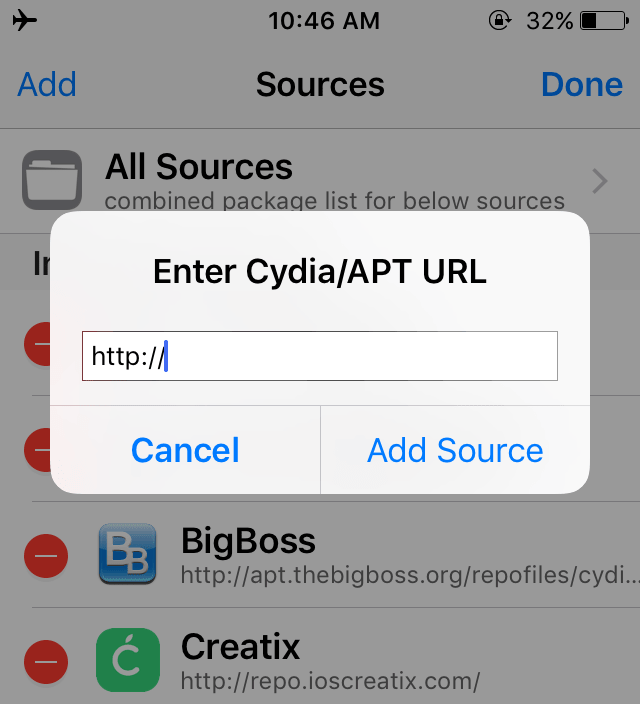
Step 4 Go to Manage > Sources. Select Edit at the top right > Add.

How to Install Ext3nder on iOS 10/10.1.1/10.2


Step 5 Enter the URL of Julioverne’s repository – https://julio.xarold.com/


Step 6 Install Ext3nder tool. It should be successfully installed now. The best thing is that it doesn’t require any other tweak to work.

How to Install Ext3nder on iOS 10/10.1.1/10.2

Step 7 Reboot your iOS device.


Since a lot of users were not able to get it to sign properly, here’s the complete signing tutorial.


Source: yalujailbreak


Windows
Mac OS
iOS
Linux
3uTools
Win 64-bit For this device
V9.01 2025-12-27
Download
Win 32-bit For this device
V9.01 2025-12-27
Download
3uTools
Intel Chip How to Identify Chip Type
V9.01 2025-12-31
Download
Apple Silicon
V9.01 2025-12-31
Download
How to Identify Chip Type
1.  Click the Apple icon in the top-left corner of the screen and select About This Mac.
2.  Check the Processor or Chip field to determine if it is "Intel" or "Apple".
Please use the 3uTools PC client to install the iOS client:
1、 Install either the Windows or Mac version of 3uTools on your computer
2、 Open the PC client and connect your device to the computer via USB cable
3、 After the connection is successful, wait for the computer to automatically install the mobile app for the device, or locate “Install Mobile App” on the computer and manually click to install.
3uTools
deb file
V3.01 2025-11-20
Download
rpm file
V3.01 2025-11-20
Download
Windows
Windows
iOS
iOS
Android
Android
TV
TV
3uAirPlayer
Win 64-bit For this device
V6.0.2 2025-11-19
Download
Win 32-bit For this device
V6.0.2 2025-11-19
Download
iOS Device Mirroring (No App Required)
1、 Install 3uAirPlayer on the Windows PC
2、 Open Control Center and select Screen Mirroring
3、 From the list, choose your PC to start mirroring
4、 Or connect your iOS device to the PC via USB to begin mirroring
Scan to get "3uAirPlayer" App
3uAirPlayer TV V1.0.18
2025-11-28
TV System Requirements: Android 7.0 or later
Download the TV installation package, copy it to a USB drive, insert it into your TV or set-top box, then select the file from the home screen to install.




