
NEWS

Lady Gaga Paid Tribute to Steve Jobs and Performed on Giant Rainbow Stage in Apple Park

05/20/2019

2736

Lady Gaga caused a minor stampede at Apple's headquarters in Cupertino, Calif. when she took to a giant, rainbow-covered stage for a surprise set on Friday (May 17).
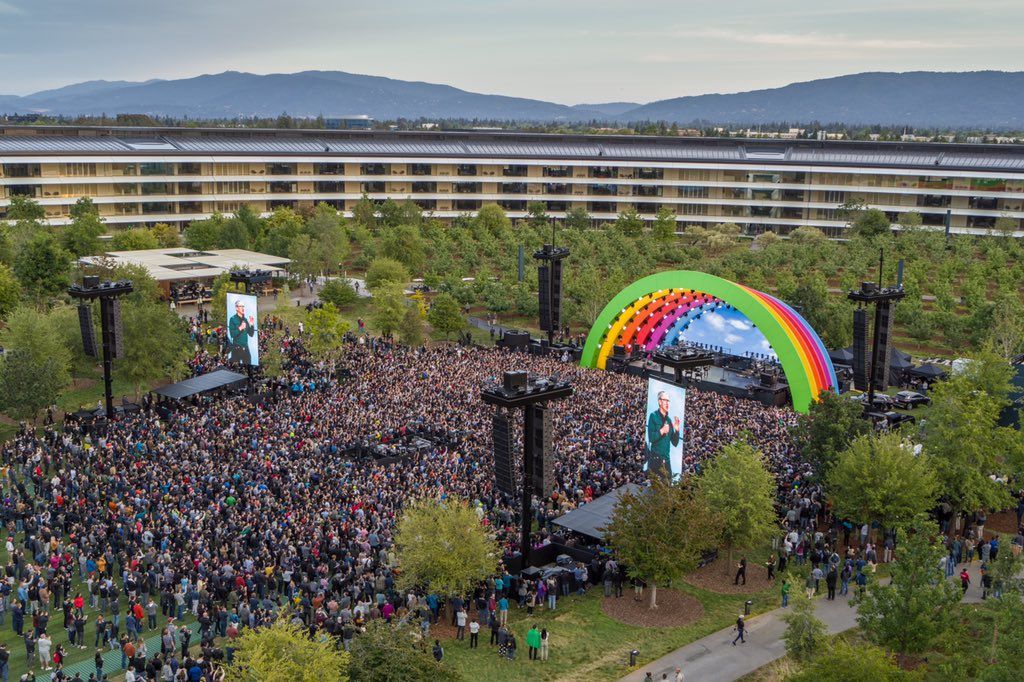

Lady Gaga Paid Tribute to Steve Jobs and Performed on Giant Rainbow Stage in Apple Park


The event, which marked the formal opening of Apple Park, featured Gaga as a secret headliner -- and when Apple employees found out that she'd be performing in the middle of their campus, they dropped what they were doing and ran towards the colorful archways that had been constructed in the center of the grassy expanse.


Wearing a cerulean wig and neon pieces pulled from the costume closet of her Enigma residency in Las Vegas, Gaga played through a number of her greatest hits, including her award(s)-winning "Shallow" from A Star Is Born. She also paused for a moment of silence for Apple founder Steve Jobs, who died from complications following pancreatic cancer in 2011.


Apple CEO Tim Cook thanked Jobs in a heartfelt message he posted after the event, and thanked Gaga for "making our celebration unforgettable."


Source: billboard

Windows
Mac OS
iOS
Linux
3uTools
Win 64-bit For this device
V9.0 2025-11-11
Download
Win 32-bit For this device
V9.0 2025-11-11
Download
3uTools
Intel Chip How to Identify Chip Type
V9.0 2025-12-02
Download
Apple Chip
V9.0 2025-12-02
Download
How to Identify Chip Type
1.  Click the Apple icon in the top-left corner of the screen and select About This Mac.
2.  Check the Processor or Chip field to determine if it is "Intel" or "Apple".
Please use the 3uTools PC client to install the iOS client:
1、 Install either the Windows or Mac version of 3uTools on your computer
2、 Open the PC client and connect your device to the computer via USB cable
3、 After the connection is successful, wait for the computer to automatically install the mobile app for the device, or locate “Install Mobile App” on the computer and manually click to install.
3uTools
deb file
V3.01 2025-11-20
Download
rpm file
V3.01 2025-11-20
Download
Windows
Windows
iOS
iOS
Android
Android
TV
TV
3uAirPlayer
Win 64-bit For this device
V6.0.2 2025-11-19
Download
Win 32-bit For this device
V6.0.2 2025-11-19
Download
iOS Device Mirroring (No App Required)
1、 Install 3uAirPlayer on the Windows PC
2、 Open Control Center and select Screen Mirroring
3、 From the list, choose your PC to start mirroring
4、 Or connect your iOS device to the PC via USB to begin mirroring
Scan to get "3uAirPlayer" App
3uAirPlayer TV V1.0.18
2025-11-28
TV System Requirements: Android 7.0 or later
Download the TV installation package, copy it to a USB drive, insert it into your TV or set-top box, then select the file from the home screen to install.





